

Fireflies vs Otter is a common choice for anyone who wants an AI note taker to record meetings, transcribe them, and turn them into summaries and action items. Both tools join your Zoom, Google Meet, and Microsoft Teams calls, and both offer free plans. The differences are in limits, languages, pricing, and how each one fits into your workflow.
All plan details below come from the official Fireflies.ai and Otter.ai pricing pages, checked on November 1, 2026. Pricing and limits change often, so confirm before you buy.

Fireflies vs Otter: Quick Verdict
- Choose Fireflies if you want unlimited transcription even on the free plan, support for 100+ languages, lots of integrations, and AI tools for follow-up such as AskFred.
- Choose Otter if you mainly hold English (or one of its supported languages) meetings, want a simple live-transcription experience on web and mobile, and are fine with monthly minute limits on lower plans.
For sales teams and agencies that run many client calls, Fireflies’ unlimited transcription is a strong advantage. For individuals who want live captions and quick notes, Otter is easy to start with.
Affiliate link — we may earn a commission.
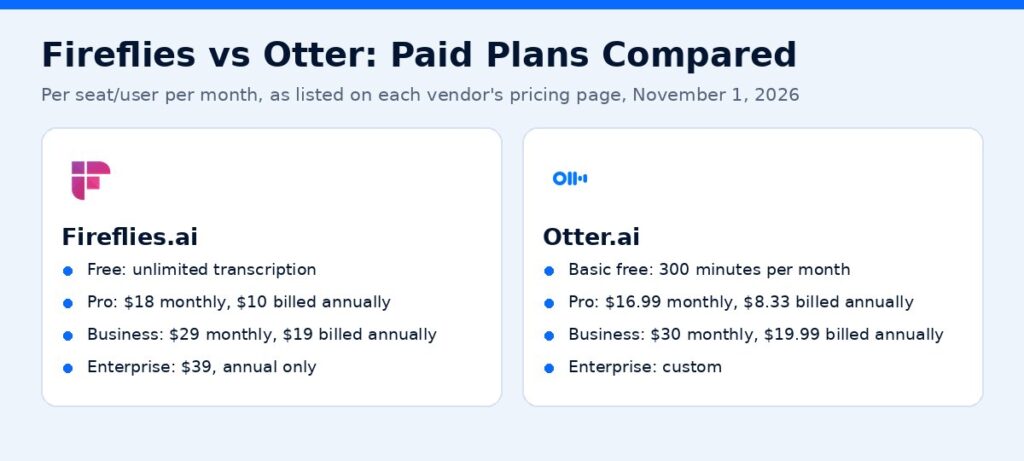
Fireflies vs Otter AI Pricing
| Plan | Fireflies.ai | Otter.ai |
|---|---|---|
| Free | $0: unlimited transcription, limited AI summaries, 400 mins storage per team, 20 AI credits | $0 (Basic): 300 transcription minutes per month, up to 30 mins per conversation, 3 lifetime file imports |
| Pro | $18/seat/month monthly, or $10/seat/month billed annually | $16.99/user/month monthly, or $8.33/user/month billed annually |
| Business | $29/seat/month monthly, or $19/seat/month billed annually | $30/user/month monthly, or $19.99/user/month billed annually |
| Enterprise | $39/seat/month, annual only | Custom (schedule a demo) |
Prices as listed on each vendor’s pricing page on November 1, 2026. Otter’s page also showed a limited-time discount on Business for the first three months.
Plan Limits That Matter
Fireflies
- Free: unlimited transcription, limited AI summaries, 400 minutes of storage per team
- Pro: unlimited transcription and AI summaries, 8,000 minutes of storage per seat, video recording, downloads of transcripts, summaries and recordings, unlimited integrations
- Business: unlimited storage, more AI credits, multi-language mode, conversation intelligence, and team analytics for admins
- Enterprise: adds SSO, SCIM, HIPAA compliance, private storage, custom data retention, and audit logs
Otter
- Basic (free): 300 monthly transcription minutes, conversations up to 30 minutes, three lifetime audio or video imports
- Pro: 1,200 monthly minutes, meetings up to 90 minutes, 10 imports per month, advanced search and export, Salesforce, HubSpot, and Zapier integrations (Otter notes user limits on the CRM integrations)
- Business: unlimited meetings and in-app recordings, meetings up to 4 hours, unlimited imports, three concurrent meetings, and admin features
- Enterprise: SSO, SCIM, enterprise security controls, HIPAA (add-on), and API and webhooks
The biggest practical difference: Fireflies’ free and paid plans list unlimited transcription, while Otter’s Basic and Pro plans cap monthly minutes and meeting length.
Languages
Fireflies says it transcribes in 100+ languages. Otter’s pricing page lists AI transcription in English, Spanish, French, German, Japanese, and Chinese. If your meetings happen in other languages, Fireflies is the safer pick.
Features Compared
| Feature | Fireflies.ai | Otter.ai |
|---|---|---|
| Joins Zoom, Google Meet, Teams | Yes | Yes |
| Live transcription | Yes (real-time notes) | Yes |
| AI summaries and action items | Yes | Yes |
| AI assistant / chat | AskFred | Otter AI Chat |
| Upload audio or video files | Yes | Yes (limits on lower plans) |
| Mobile apps | Android and iOS | Android and iOS |
| Desktop app | Yes | Mac and Windows |
| Chrome extension | Yes | Yes |
| API access | Yes, with rate limits by plan | Enterprise plan |
| HIPAA | Enterprise | Enterprise add-on |
Feature names come from each vendor’s pricing page as of November 1, 2026.
Free Plan Showdown: Fireflies Free vs Otter Basic
If you want to start free, the free plans differ in an important way.
Fireflies Free lists unlimited transcription, but AI summaries are limited and storage is capped at 400 minutes per team. That makes it good for testing the bot on real meetings, though you will run into the storage cap quickly if you record a lot.
Otter Basic gives you 300 transcription minutes per month and caps each conversation at 30 minutes. That suits short calls and quick voice notes, but longer client meetings will be cut off.
For a small business owner with a few 30 to 60 minute calls each week, neither free plan is a long-term home. They are best used as a trial to decide which paid plan you prefer.
Security and Privacy
Meeting recordings often contain client details, pricing, and personal information, so security matters.
- Fireflies’ pricing page lists SOC 2 Type II and GDPR compliance, with HIPAA compliance, SSO, SCIM, private storage, custom data retention, and audit logs on the Enterprise plan.
- Otter’s pricing page lists SSO, SCIM, domain capture, enterprise-grade security controls, and HIPAA compliance (as an add-on) on its Enterprise plan.
If you work in healthcare, legal, or finance, talk to each vendor about your requirements before recording client calls, and check your own industry rules.
Setting Up an AI Note Taker in Under 15 Minutes
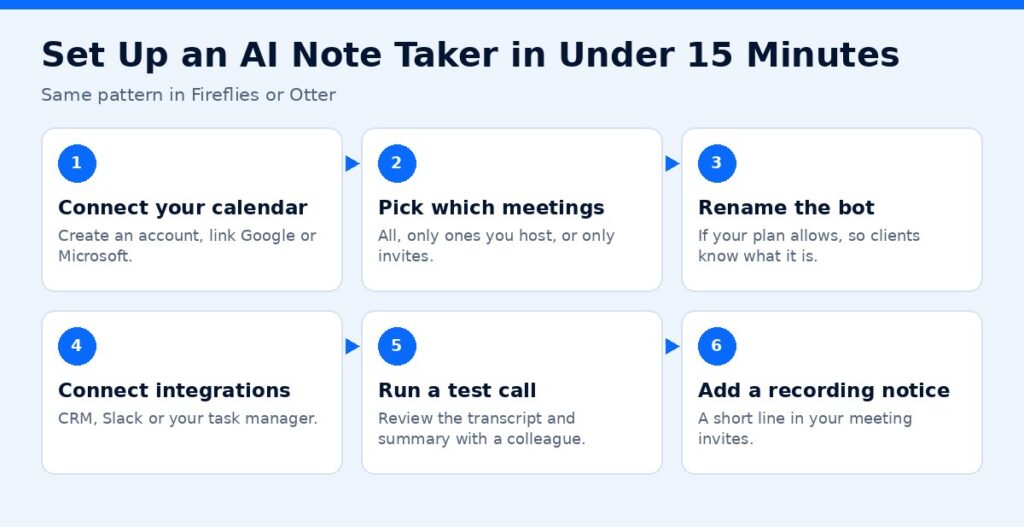
Whichever tool you choose, setup follows the same pattern:
- Create an account and connect your Google or Microsoft calendar.
- Choose which meetings it joins: all meetings, only ones you host, or only ones you invite it to.
- Rename the bot if your plan allows, so clients know what it is.
- Connect integrations such as your CRM, Slack, or task manager.
- Run a test call with a colleague and review the transcript and summary.
- Share a short recording notice in your meeting invites.
Fireflies vs Otter vs Fathom
Fathom is a third option people often compare. Its pricing page lists a free plan with unlimited recordings and transcriptions and instant AI call summaries, plus paid plans for individuals and teams. If you mostly need solid free recording for Zoom calls, it is worth a look too. Compare all three on your real meeting volume and the integrations you need.
Example Scenarios
- A two-person agency with daily client calls: Fireflies Pro, because unlimited transcription and integrations keep every call searchable without watching minute counts.
- A consultant with a few English-language calls a week: Otter Pro, especially billed annually, if the 1,200 monthly minutes and 90-minute meeting cap fit comfortably.
- A sales team that needs call analytics: Fireflies Business or Otter Business, compared on CRM integration and team reporting.
- A team with clients in several countries: Fireflies, for its broader language support.
Which AI Note Taker Is Best for Small Businesses?
Pick Fireflies if:
- You run many client or sales calls and do not want minute limits
- Your meetings involve more than one language
- You want strong integration options and API access on standard plans
- You want to search across past meetings and pull out tasks
Pick Otter if:
- You want quick live transcription for English-language meetings, lectures, or interviews
- You have a modest number of meetings each month
- You like using a mobile app to record in-person conversations
How to Get the Most Out of Any AI Note Taker
- Tell people the meeting is recorded. Recording consent laws vary by state, and transparency builds trust.
- Name speakers so summaries assign action items correctly.
- Connect your CRM or task tool so action items do not stay buried in a transcript.
- Review the summary before sending it to a client.
- Set retention rules so you are not storing sensitive recordings forever.
Turn Meeting Notes Into Automated Follow-Up
An AI note taker is most valuable when it feeds the rest of your process: updating the CRM, creating tasks, and sending a follow-up email after each sales call. ScaleMyClick builds these workflows as part of our AI automation solutions. Get a free marketing audit.
Affiliate link — we may earn a commission.
Related guides
- Fireflies AI Review 2026: Features, Pricing, Pros and Cons
- Best AI Tools for Small Business Owners in 2026
- Wispr Flow Review 2026: Is This AI Dictation App Worth It?
- Marketing Tools & Resources (our recommended tools)
FAQs
Is Fireflies better than Otter?
It depends on your needs. Fireflies lists unlimited transcription on all plans and 100+ languages. Otter is simple and strong for live English transcription but caps minutes on lower plans.
Is Fireflies free?
Yes. Fireflies has a free plan with unlimited transcription, limited AI summaries, and 400 minutes of storage per team.
Is Otter free?
Otter’s Basic plan is free, with 300 transcription minutes per month and conversations up to 30 minutes.
Which is cheaper, Fireflies or Otter?
Billed annually, Otter Pro ($8.33/user/month) was slightly cheaper than Fireflies Pro ($10/seat/month) on November 1, 2026, but Fireflies Pro has no monthly transcription cap. Compare based on how many hours you record.
Do AI note takers work with Zoom, Google Meet, and Teams?
Yes. Both Fireflies and Otter list support for Zoom, Google Meet, and Microsoft Teams.
Sources
- Fireflies.ai pricing (checked November 1, 2026)
- Otter.ai pricing (checked November 1, 2026)
- Fathom pricing (checked November 1, 2026)
This contains an affiliate link.

