

This Fireflies AI review covers what the meeting assistant does, its 2026 pricing, security, and its pros and cons. In short: Fireflies.ai joins your Zoom, Google Meet and Microsoft Teams calls, transcribes them in 100+ languages, and turns them into searchable notes, summaries and action items. There is a free plan, and Pro costs $18 per seat per month on monthly billing or $10 billed annually, as of November 2026.
Overall, it is a fit for small businesses and agencies that spend a lot of time on sales calls, client meetings and internal check-ins and want a reliable record without someone taking notes by hand.
What Is Fireflies.ai?
Fireflies.ai is an AI meeting assistant. Its homepage describes it as a tool to “transcribe, summarize, search, and analyze all your team conversations.” It can join meetings as a bot, record using a Chrome extension without the bot, or transcribe audio and video files you upload.
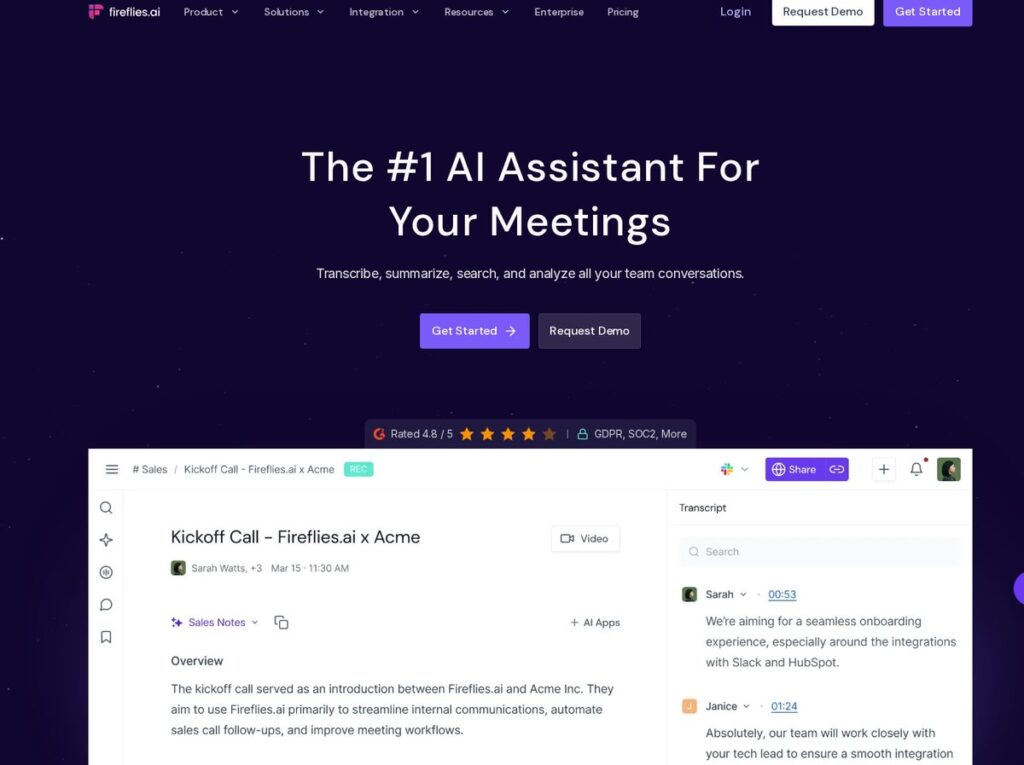
After a meeting, Fireflies gives you a transcript, an AI summary, action items and a searchable record. Its AI assistant, AskFred, also lets you ask questions about a meeting or across meetings.
Fireflies AI Features
Based on the Fireflies pricing and features page, the core features include:
- Meeting recording and transcription for Zoom, Google Meet, Microsoft Teams and more, in 100+ languages.
- Real-time notes and live transcription during calls.
- AI summaries and action items after each meeting (limited on Free, unlimited on paid plans).
- AskFred, an AI assistant for questions about your meetings.
- Search within a meeting and, on paid plans, across all meetings.
- Apps: desktop app, mobile apps for Android and iOS, and a Chrome extension.
- Integrations and API for connecting meeting data to other tools.
- Team features on Business: conversation intelligence, team analytics and multi-language mode.
Fireflies AI Pricing (November 2026)
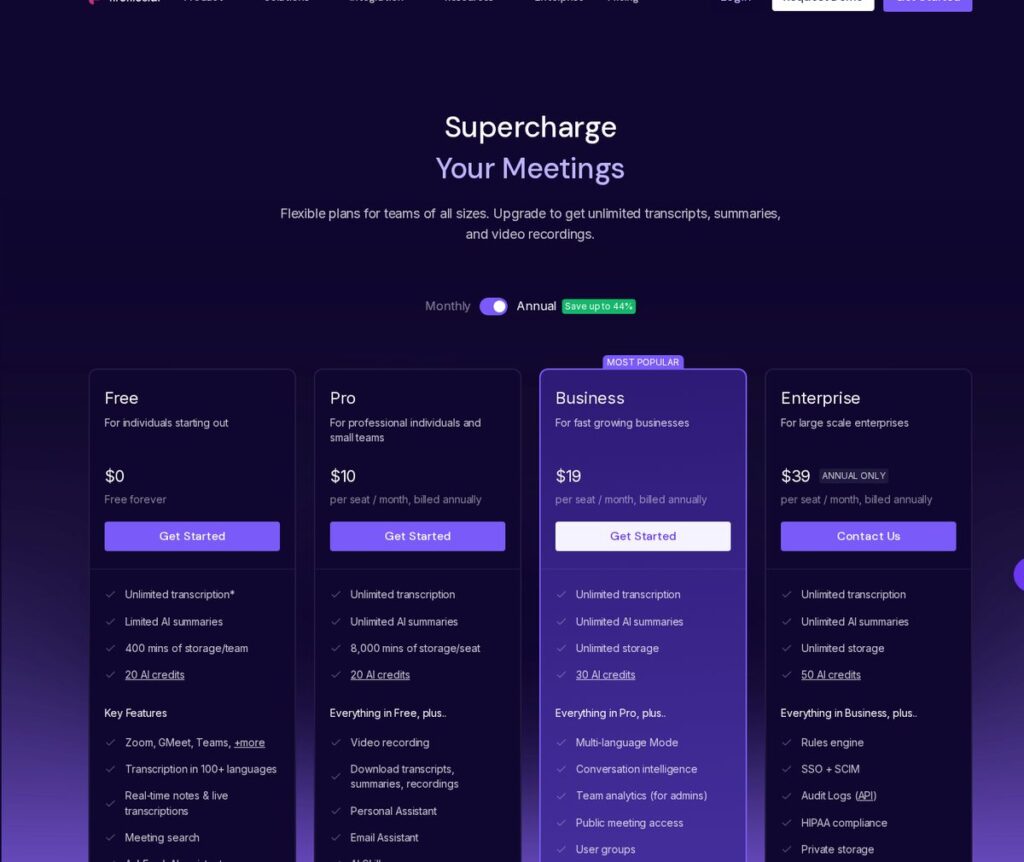
The official Fireflies pricing page showed these prices on November 3, 2026. Prices change; check the page before you buy.
| Plan | Monthly billing | Annual billing | Highlights |
|---|---|---|---|
| Free | $0 | $0 | Unlimited transcription*, limited AI summaries, 400 mins storage per team, 20 AI credits |
| Pro | $18/seat/mo | $10/seat/mo | Unlimited summaries, 8,000 mins storage per seat, video recording, downloads, unlimited integrations |
| Business | $29/seat/mo | $19/seat/mo | Unlimited storage, 30 AI credits, conversation intelligence, team analytics, multi-language mode |
| Enterprise | Annual only | $39/seat/mo | SSO + SCIM, HIPAA compliance, rules engine, audit logs, private storage, 50 AI credits |
The page also marks free-plan transcription with an asterisk, and lists recording limits of 2 hours on Free and Pro, 3 hours on Business and 4 hours on Enterprise. The page also shows annual billing saving up to 44%.
Affiliate link — we may earn a commission.
Is Fireflies.ai Safe? Security and Privacy
Meeting recordings often include client details, pricing and sometimes personal information, so security matters. Fireflies’ homepage lists:
- SOC 2 Type II.
- ISO 42001, a standard for governing and managing AI.
- HIPAA and FERPA options: a BAA for healthcare and a DSA for education, available on Enterprise with Private Storage.
- Zero data retention, stating customer data is never used for AI training.
Also make sure everyone on a call knows it is being recorded. Recording-consent laws vary by state, so tell participants and follow the rules that apply to you. This is not legal advice.
Fireflies AI Pros and Cons
Pros
- Free plan with unlimited transcription to start.
- Works with the major video meeting platforms.
- Transcription in 100+ languages.
- AI summaries, action items and AskFred save time after calls.
- Clear security documentation, with HIPAA options on Enterprise.
Cons
- Free plan limits AI summaries and storage.
- A bot joining calls can feel awkward for some clients (the Chrome extension is an alternative).
- Recording limits per meeting depend on your plan.
- Every plan also caps credits for AI features.
Which Fireflies Plan Should You Choose?
| If you… | Consider |
|---|---|
| Want to try AI meeting notes on a few calls | Free |
| Are a solo consultant or small team that needs unlimited summaries and downloads | Pro |
| Manage a sales or client team and want analytics and unlimited storage | Business |
| Need SSO, HIPAA compliance or custom data retention | Enterprise |
A common path is to start on Free, then move individual heavy users to Pro rather than buying seats for the whole company on day one. Annual billing lowers the per-seat cost a lot (Pro drops from $18 to $10 a month), so switch to annual once you know who actually uses it.
Tips for Better Meeting Transcripts
- Use a decent microphone or headset, because clear audio helps any transcription tool.
- Ask people to say their names at the start of the call so speakers are easier to identify.
- Similarly, avoid talking over each other on key decisions.
- Edit the transcript where names or numbers are wrong before you share the summary.
- Create a channel or folder for each client so their meetings are easy to find later.
Fireflies also lets you edit transcripts and add time-stamped notes, which is useful when a summary needs a correction before it goes to a client.
Who Should Use Fireflies.ai?
| Team | How it helps |
|---|---|
| Sales teams | Call notes, action items and follow-up details captured automatically |
| Agencies | A searchable record of client requests and approvals |
| Recruiters | Interview transcripts and summaries |
| Small business owners | Notes from vendor and partner calls without typing |
| Remote teams | A shared record for people who missed the meeting |
For sales teams, meeting notes are most useful when they land in your CRM. If you are choosing one, our HighLevel vs HubSpot comparison and best digital marketing tools for small businesses can help.
How to Get Started With Fireflies
- Sign up for the free plan and connect your calendar.
- Choose which meetings Fireflies should join automatically.
- Next, run it on a few internal meetings first and review the transcripts and summaries.
- Set up integrations so notes go where your team already works.
- Upgrade to Pro or Business when you need unlimited summaries, more storage or team analytics.
Affiliate link — we may earn a commission.
The Bottom Line on Fireflies.ai
Fireflies.ai is a practical choice if your week is full of calls and the notes keep slipping. In short, the free plan is generous enough to test on real meetings, the paid plans charge per seat, and the security documentation is clear. So try it on a week of calls, check the summaries against what was really said, and upgrade only the people who use it every day.
Related guides
- Best AI Tools for Small Business Owners in 2026
- Wispr Flow Review 2026: Is This AI Dictation App Worth It?
- GoHighLevel Review 2026: Is This All-in-One CRM Worth It for Your Agency?
Fireflies AI Review FAQ
Can Fireflies.ai be trusted?
Fireflies lists SOC 2 Type II and ISO 42001 on its website, offers HIPAA options on Enterprise, and states that customer data is not used for AI training. Review its Trust Center against your own requirements.
Is Fireflies.ai completely free?
There is a free plan with unlimited transcription, limited AI summaries, 400 minutes of storage per team and 20 AI credits. Paid plans add unlimited summaries, more storage and team features.
Is Fireflies AI any good?
It is a widely used meeting assistant with a broad feature set. Whether it is good for you depends on your meeting platforms, how much you rely on summaries and integrations, and your security needs. The free plan is the easiest way to judge.
How much does Fireflies cost?
As of November 2026: Free $0, Pro $18/seat/month monthly or $10 annually, Business $29 monthly or $19 annually, and Enterprise $39/seat/month on annual billing only.
Make Every Sales Call Count
Notes are only useful if follow-up happens. Get a free marketing audit from ScaleMyClick to see how call notes, CRM and AI automation can work together.

