

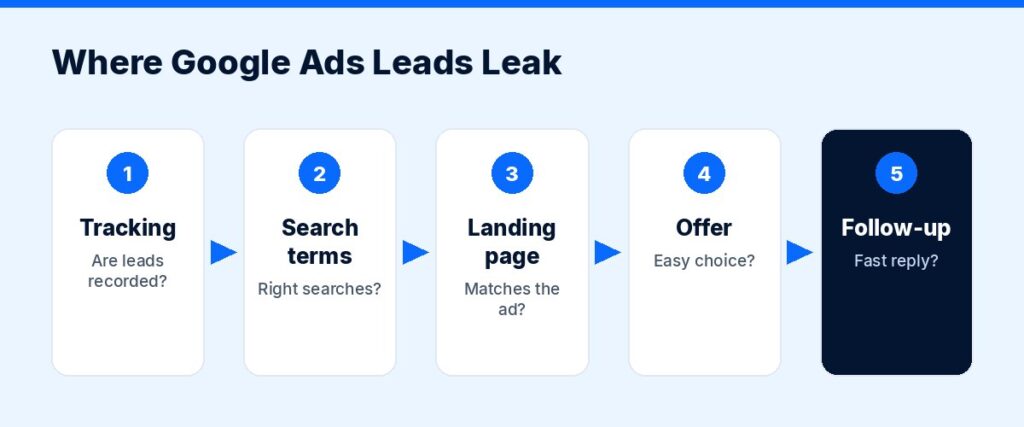
Clicks are coming in, the budget is going out, but the phone is quiet. If your Google Ads are not converting, the problem is almost always fixable, and it is usually in one of a handful of places: tracking, targeting, the landing page, the offer or the follow-up. This guide walks through 11 fixes in the order we recommend checking them, so you can find the leak before spending another dollar.
First, Check What “Normal” Looks Like

Before deciding your ads are failing, compare them with a benchmark. WordStream’s Google Ads benchmarks for 2026 report an average conversion rate of 8.18% across industries, with wide variation: for example 4.85% for business services, 8.05% for home and home improvement, and 10.67% for dentists. If you are far below the range for your industry, the fixes below matter even more. If you are close to it, focus on cost per lead and lead quality instead.
Fix 1: Make Sure Conversion Tracking Actually Works
The most common reason ads “do not convert” is that conversions happen but are not recorded. Check:
- Is a conversion action set up for each thing that matters: form submissions, calls from ads, calls from your website, bookings, purchases?
- Does the thank-you page or event fire only once per conversion?
- Are phone calls tracked? For many local businesses, most leads come by phone.
- Test it yourself: submit a form, make a call, and confirm it shows in Google Ads (allowing for reporting delay).
For more accurate measurement, Google offers enhanced conversions, which supplements your conversion tags with hashed first-party data such as email addresses. If your setup is broken, every automated bidding decision Google makes is based on bad data.
Fix 2: Read Your Search Terms Report
Keywords are what you bid on; search terms are what people actually typed. Google’s search terms report shows the real searches that triggered your ads. Look for:
- Searches unrelated to your business.
- Job seekers (“plumber jobs”), DIY (“how to fix…”), free or cheap seekers.
- Searches in areas you do not serve.
- Competitor names, if you do not want to bid on them.
Fix 3: Add Negative Keywords
Turn what you found in fix 2 into negative keywords so you stop paying for those searches. Build a starter list (“jobs,” “salary,” “free,” “DIY,” “course,” “training,” and so on, as relevant), then review search terms weekly and keep adding.
Fix 4: Tighten Keyword Match Types and Themes
Broad keywords and loose ad groups pull in irrelevant traffic. Group keywords by service (“AC repair,” “AC installation”) so each ad group has one clear theme, and make sure your match types fit your budget. Smaller budgets usually do better with tighter targeting.
Fix 5: Send Each Ad to the Right Landing Page
Sending every click to your homepage is one of the biggest conversion killers. A person searching “emergency water heater repair” should land on a page about exactly that, with:
- A headline that matches the search.
- A clear phone number (tap-to-call on mobile) and a short form.
- Proof: reviews, photos, licenses, guarantees.
- Service area and response time.
- One clear call to action.
Our website design and development service builds landing pages designed for ad traffic.
Fix 6: Speed Up Your Page and Fix Mobile Issues
Many of your clicks come from phones. Test your landing page in Google’s PageSpeed Insights, then open it on your own phone. Check that it loads quickly, the button is easy to tap, the form works and nothing covers the content. A slow or broken mobile page wastes paid clicks.
Fix 7: Match Your Ad Message to Your Page
If your ad promises “Same-Day Service, Free Estimate” and the landing page never mentions either, people leave. Make the ad’s promise the page’s headline. Consistency builds trust in the few seconds a visitor gives you.
Fix 8: Strengthen Your Offer
Sometimes the ads and page are fine, but the offer is not compelling compared with competitors. Look at the other ads on your main searches. Then ask what would make you the easy choice:
- A clear price range or “starting at” price.
- A guarantee.
- Fast availability (“today” or “this week”).
- Financing, if relevant.
- A simple next step: free estimate, free consultation, instant quote.
Fix 9: Check Locations, Schedule and Devices
- Location: Make sure you target people in your service area, and review the location settings that control whether you target people who are in, or merely interested in, your area.
- Schedule: If nobody answers the phone at night, consider limiting call-focused ads to business hours.
- Devices: Compare conversion rates by device and fix the weak one rather than ignoring it.
Fix 10: Use the Right Bidding Strategy for Your Data
Smart Bidding strategies (such as maximize conversions) depend on accurate conversion data. If tracking was broken (fix 1), or you have very few conversions, automated bidding may struggle. Fix tracking first, give the account enough conversions to learn, and avoid changing bidding strategies too often.
Fix 11: Fix the Follow-Up, Not Just the Ads
Some “not converting” problems happen after the lead arrives:
- Calls go to voicemail.
- Form leads get a reply the next day, after the customer has hired someone else.
- No one follows up when a quote is not accepted.
Speed matters. Automations like instant text replies, missed-call text back and lead routing can recover leads you are already paying for. Our AI automation solutions team sets these up for small businesses.
What a Healthy Setup Looks Like
Put the fixes together and a healthy small-business account usually has: working call and form tracking that counts each lead once; tightly themed ad groups for each core service; a growing negative keyword list; one dedicated landing page per service with a matching headline; a fast mobile page with tap-to-call; a clear offer; ads scheduled for hours when someone can respond; and a follow-up process that answers every lead within minutes, not hours. Each of these is simple on its own. Together they are the difference between paying for clicks and paying for customers.
A Quick Diagnostic Checklist
| Symptom | Most likely cause | Start with |
|---|---|---|
| Clicks but zero recorded conversions | Tracking broken | Fix 1 |
| Lots of irrelevant leads | Search terms too broad | Fixes 2–4 |
| High bounce, few form fills | Landing page or speed | Fixes 5–7 |
| Leads come in but don’t buy | Offer, targeting or follow-up | Fixes 8, 9, 11 |
| Conversions dropped suddenly | Tracking or site change, bidding change | Fixes 1, 6, 10 |
Still Not Converting?
If you have worked through these and results have not improved, it may be time for a fresh pair of eyes. Our Google Ads and PPC management service starts with a full account audit covering tracking, search terms, structure, landing pages and follow-up. You may also want to compare channels: see SEO vs Google Ads and our guide to Google Ads budgets for small businesses.
Get Your Free Marketing Audit
Not sure where your next customers should come from? ScaleMyClick’s free marketing audit looks at your SEO, ads, website conversion and automation and points out 3 specific opportunities that could be limiting your growth. No pressure, no long contract talk, just a clear next step.
Related guides
- Landing Page Best Practices for 2026: 14 Rules That Lift Conversions
- How to Generate Leads for a Small Business: 15 Proven Ways
- Google Ads Budget for Small Business: How Much to Spend
FAQ: Google Ads Not Converting
Why are my Google Ads getting clicks but no conversions?
The most common causes are broken conversion tracking, irrelevant search terms, a landing page that does not match the search, a slow mobile page, or a weak offer. Check tracking first, then search terms, then the landing page.
What is a good conversion rate for Google Ads?
It depends on your industry. WordStream’s 2026 benchmarks report an 8.18% average across industries, ranging from under 3% in some industries to over 15% in others.
How do I know if my conversion tracking is working?
Test it: submit a form and make a call from an ad or your site, then confirm the conversion appears in Google Ads after the normal reporting delay. Check that each action counts once.
How long should I wait before changing my Google Ads?
Give changes enough time and data to show a trend, especially with automated bidding. Avoid making major changes every few days, but do review search terms and leads every week.
Should I hire someone to fix my Google Ads?
If you have checked the basics and still see poor results, or you do not have time to manage the account weekly, a specialist audit can usually find the problem faster than trial and error.

