

“How much should I spend on Google Ads?” is one of the first questions every owner asks, and the answer is not a magic number. The right Google Ads budget for a small business comes from three things you already know or can estimate: how much a click costs in your industry, how many clicks it takes to get a lead, and how much a new customer is worth to you. This guide walks you through the math, with current benchmarks and how Google actually bills you.
How Much Do Google Ads Cost Per Month?

There is no minimum spend in Google Ads; you set your own budget. What matters is whether the budget is big enough to get useful data and leads in your market.
To get a feel for costs, WordStream publishes annual benchmarks. Its Google Ads benchmarks for 2026 analyzed more than 13,000 search campaigns across 23 industries (April 2025 to March 2026) and reported:
- Average cost per click: $5.42
- Average conversion rate: 8.18%
- Average cost per lead: $66.69
Averages hide big differences between industries. A few examples from the same report:
| Industry | Avg. cost per click | Avg. conversion rate | Avg. cost per lead |
|---|---|---|---|
| Attorneys & Legal Services | $9.87 | 5.55% | $131.63 |
| Home & Home Improvement | $8.33 | 8.05% | $90.92 |
| Dentists & Dental Services | $8.00 | 10.67% | $72.97 |
| Automotive Repair, Service & Parts | $4.35 | 15.51% | $29.96 |
| Business Services | $5.87 | 4.85% | $93.69 |
| Real Estate | $3.22 | 3.70% | $102.51 |
| Restaurants & Food | $2.05 | 8.05% | $30.57 |
Use these as rough starting points only. Your real costs depend on your city, your competitors, your keywords and how well your ads and landing pages perform.
How Google Ads Billing Works
Google Ads budgets are set as an average daily budget per campaign. Google explains in its help article on average daily budgets that, for most campaigns:
- On a given day, your campaign may spend up to 2 times your average daily budget, to take advantage of busier days.
- Across a month, you will not be charged more than 30.4 times your average daily budget (30.4 is the average number of days in a month).
So if you set $20 per day, one day might cost up to $40, but your monthly charge for that campaign will not exceed $20 × 30.4 = $608.
The Simple Formula for Your Google Ads Budget
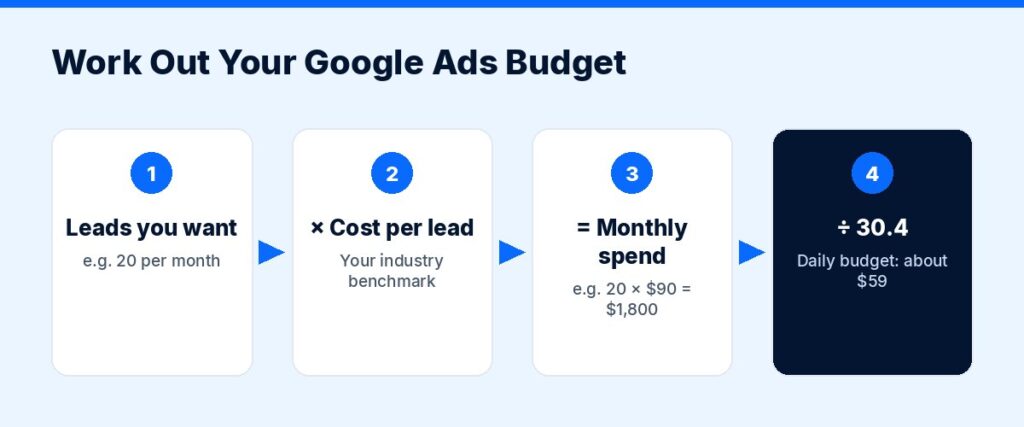
Work backwards from the leads you want.
- Decide how many leads you want per month. Example: 20 leads.
- Estimate your cost per lead. Use the benchmark for your industry to start, then replace it with your own data after a month or two. Example: $90 for a home services business.
- Multiply. 20 leads × $90 = $1,800 per month in ad spend.
- Check it against customer value. If you close 1 in 4 leads, 20 leads become 5 customers. If each customer is worth $1,500 in profit, that is $7,500 in profit for $1,800 in ad spend, before management fees.
- Divide by 30.4 to get your daily budget: $1,800 ÷ 30.4 ≈ $59 per day.
If the math does not work, you have three levers: improve your conversion rate (so leads cost less), raise customer value (upsells, repeat business), or narrow targeting to only the most profitable services and areas.
How Much Is Too Little?
A budget that is too small gets too few clicks to learn anything. A practical check: your monthly budget should buy enough clicks to expect several conversions.
Example: if clicks cost about $8 and your landing page converts around 8%, you need roughly 12 to 13 clicks per lead, which is about $100 per lead. A $300 monthly budget would produce about three leads, which is barely enough to judge anything. In that case, it is better to focus the budget on one service and a tight area than to spread it thin.
Ways to Make a Small Budget Go Further
- Start with one campaign for your most profitable service.
- Target a tight area around your location or the neighborhoods you serve best.
- Use specific keywords with clear intent (“water heater installation near me”) rather than broad ones (“water heater”).
- Add negative keywords so you do not pay for searches like “jobs,” “DIY” or “free.”
- Schedule ads for the hours you can actually answer the phone.
- Send clicks to a dedicated landing page for that service, with a clear call button and a short form.
- Track conversions from day one, including phone calls, so you know which keywords bring customers.
Our website design and development team builds landing pages that are made for ad traffic.
Budget Tips by Business Stage
Brand-new business: Keep the first campaign narrow: one service, one area, a dedicated landing page and full conversion tracking. Treat the first month or two as paid research. The search terms report will show you what people really type, which is valuable for your website and SEO too.
Established business with steady word of mouth: Use ads to fill specific gaps: a slow season, a new service or a new neighborhood. Set a budget per goal rather than one big pot, so you can see which goal pays off.
Growing business ready to scale: Once cost per lead is stable and profitable, add campaigns for your next most profitable services, and test new ad formats only after the core search campaign is healthy.
Whatever your stage, review the numbers monthly: spend, leads, cost per lead, and how many leads turned into paying customers.
Should You Pay for Management?
On top of ad spend, most agencies charge a management fee. Managing your own ads can work if you have time to learn and check the account weekly. A specialist is usually worth it when your spend is meaningful, your market is competitive, or you have tried before without results. When comparing agencies, always ask them to separate their fee from your ad spend, and make sure the ad account is in your name. Our Google Ads and PPC management service works this way.
What About Local Services Ads?
If you are a home service business, lawyer or similar local provider, Google’s Local Services Ads charge per lead rather than per click. They can be a good fit for some businesses. Read are Google Local Services Ads worth it? to see how they compare.
When to Increase Your Budget
Increase spend gradually, in small steps rather than doubling overnight, when:
- Your cost per lead is profitable and stable.
- Your campaigns are limited by budget (Google will show this in the account).
- You can handle more leads without hurting service quality.
Cut or pause spend on keywords, locations or times that consistently bring clicks but no leads. If clicks come in but leads do not, read our guide to fixing Google Ads that are not converting.
Not Sure Where to Start?
Our free audit reviews your market, competitors and website and gives you a realistic starting budget and plan.
Get Your Free Marketing Audit
Not sure where your next customers should come from? ScaleMyClick’s free marketing audit looks at your SEO, ads, website conversion and automation and points out 3 specific opportunities that could be limiting your growth. No pressure, no long contract talk, just a clear next step.
Related guides
- Marketing Budget for a Small Business: How to Set One
- How Much Do Digital Marketing Agencies Charge Per Month?
- SEO vs Google Ads: Which Should a Small Business Do First?
FAQ: Google Ads Budgets
What is a good Google Ads budget for a small business?
A good budget is one that buys enough clicks to generate several leads per month at a cost per lead you can afford. Use the formula above: leads wanted × expected cost per lead.
How much do Google Ads cost per click?
WordStream’s 2026 benchmarks put the average at $5.42 per click across industries, with legal, home improvement and dental among the highest.
Can Google spend more than my daily budget?
Yes. For most campaigns Google can spend up to 2 times your average daily budget on a single day, but your monthly charge will not exceed 30.4 times your average daily budget.
Is $500 a month enough for Google Ads?
It can be in lower-cost industries or very small areas, if you focus on one service and track conversions. In expensive industries it may only buy a handful of clicks, so focus is essential.
How long before I know if Google Ads is working?
Give a new campaign a few weeks to gather data, while watching search terms and conversions closely. Make decisions on cost per lead and lead quality, not on clicks alone.

