

The Semrush free trial gives you seven days to explore one of the most widely used SEO and marketing platforms before you pay. Seven days goes fast, though. To get real value, you need to know how the trial works, what it costs afterward, how to cancel, and exactly what to test.
Facts in this guide come from Semrush’s own pricing page, free trial page, and knowledge base, checked on November 1, 2026. Terms can change, so confirm on Semrush’s site when you sign up.
How the Semrush Free Trial Works
- Length: Semrush advertises a free 7-day trial: “Try Semrush free for seven days. Cancel anytime.”
- Card required: you add a payment card to start the trial. Semrush’s billing FAQ explains that it sends a $1 (or equivalent) authorization request to your bank to verify the card; Semrush says this is not a charge and it is usually reversed quickly.
- One trial per person: Semrush’s billing FAQ says the free trial can be used only once. Later attempts lead to a paid monthly plan.
- Auto-renewal: if you do not cancel before the trial ends, it converts to a paid subscription and you are charged under the terms you agreed to.
Affiliate link — we may earn a commission.
Semrush Free Trial Without a Credit Card?
The 7-day trial requires a card. If you do not want to add one, Semrush also has a free plan that needs no credit card. According to the pricing page, it includes one demo project and 10 reports per day across core tools. It is limited, but useful for quick checks before you decide whether a trial is worth starting.
Semrush Pricing After the Trial
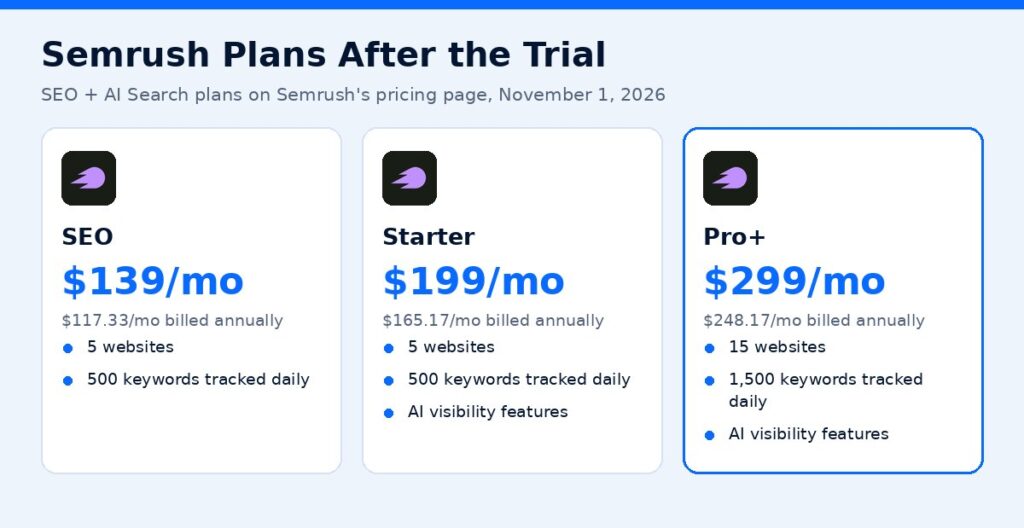
On November 1, 2026, Semrush’s pricing page listed these SEO + AI Search plans:
| Plan | Monthly billing | Billed annually (per month) | Websites to monitor | Keywords tracked daily |
|---|---|---|---|---|
| SEO | $139/month | $117.33/month | 5 | 500 |
| Starter | $199/month | $165.17/month | 5 | 500 |
| Pro+ | $299/month | $248.17/month | 15 | 1,500 |
| Advanced | Custom | Custom | 40+ | 5,000+ |
Semrush says annual billing saves up to 17%. Starter and Pro+ add AI visibility features such as prompt tracking and AI visibility reports, while the SEO plan focuses on core keyword research, competitor analysis, position tracking, and site audits. Add-ons such as extra users are billed separately.
What to Test During Your 7-Day Semrush Trial
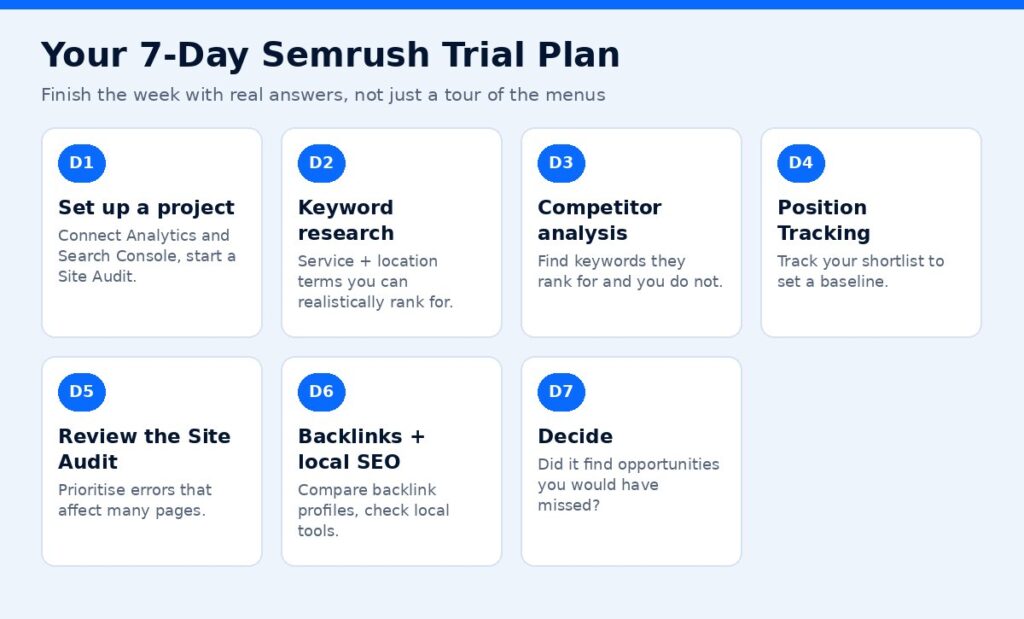
Plan your week so you finish with real answers, not just a tour of the menus.
Day 1: Set up a project for your site
Create a project for your domain, connect Google Analytics and Google Search Console if you can, and launch a Site Audit. The audit takes time to run, so start it first.
Day 2: Keyword research for your services
Use the Keyword Magic Tool or keyword overview to research what your customers search for. For a local business, include service and location terms. Export a shortlist of keywords you could realistically rank for.
Day 3: Competitor analysis
Enter two or three competitors’ domains. Look at which keywords bring them traffic, which pages rank best, and where they rank but you do not. These gaps become your content and SEO plan.
Day 4: Position Tracking
Add your shortlist to Position Tracking with your target location. This gives you a baseline you can measure against later.
Day 5: Review the Site Audit
Go through the audit results. Prioritize errors that affect many pages, like broken links, missing titles, duplicate content, or slow pages. Make a fix list.
Day 6: Backlinks and local SEO
Check your backlink profile and your competitors’. If you are a local business, explore the local tools for listings and reviews (some features are part of separate toolkits, so check what your trial includes).
Day 7: Decide
Ask yourself: did Semrush show you opportunities you would not have found otherwise? Will you log in every week? If yes, choose a plan. If not, cancel before the trial ends.
Which Plan Should You Trial?
When you start the trial, you choose a plan or toolkit. Pick the one you would realistically buy:
- SEO plan: best for small businesses and freelancers who mainly need keyword research, competitor analysis, rank tracking, and site audits for a handful of sites.
- Starter: adds AI visibility tracking (how your brand shows up in AI search) on top of core SEO tools.
- Pro+: suits growing teams and agencies that need more websites, more tracked keywords, historical data, content optimization, and multi-location tracking.
Trialing a bigger plan than you need can make the tool feel essential, then the price after the trial feels like a shock. Match the trial to your budget.
Common Semrush Trial Mistakes
- Forgetting the end date. Put a reminder in your calendar for day 5.
- Exploring without a goal. Decide the three questions you want answered before you start.
- Not exporting data. Export your keyword lists, competitor gaps, and audit issues so you keep them if you cancel.
- Skipping the confirmation email. A cancellation is not final until you click the link.
- Using a work card without approval. The card is charged automatically if the trial converts.
How to Cancel the Semrush Free Trial
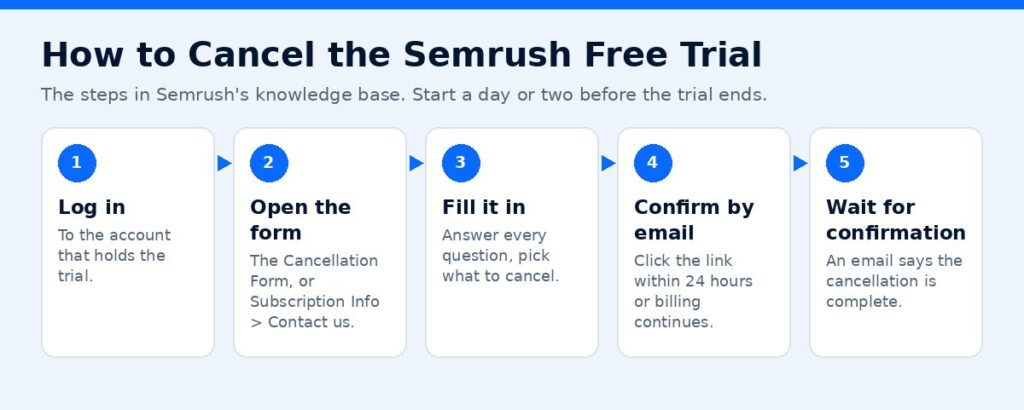
Semrush’s knowledge base explains the process:
- Log in to the Semrush account that holds the trial.
- Open the Cancellation Form (directly, or from Subscription Info by finding “Recurring: Active” and following the Contact us link).
- Complete all questions in the form and select what you want to cancel.
- Check your email for a confirmation link and click it. Semrush says the link is valid for 24 hours, and if you do not confirm, the cancellation is not processed and billing continues.
- Wait for the email confirming the cancellation is complete.
Tip: start the cancellation a day or two before the trial ends, so you have time to confirm.
Refunds
Semrush states that payments resulting from a trial that converts to a paid monthly subscription are not eligible for its standard 7-day money-back guarantee. Its one-time 7-day money-back guarantee applies to eligible purchases made directly on Semrush.com by credit card, such as an initial subscription with a 12-month or longer commitment. Read the cancellation and refund details before you start.
Is Semrush Worth It?
Semrush is worth it if you will use it regularly. It tends to suit:
- Agencies and freelancers managing several websites
- In-house marketers responsible for SEO and content
- Business owners actively investing in SEO who want to track progress
It may be more than you need if you only want to check rankings occasionally. In that case the free plan, Google Search Console, and Google Business Profile insights can cover the basics.
A practical rule: if you would spend more than a few hours a month on keyword research, competitor analysis, and site audits, a paid tool usually pays for itself in time saved. If you would rather not run the tool yourself, consider having an SEO partner handle it.
Semrush Alternatives to Consider
If Semrush feels like more than you need after the trial, there are lighter options. Google Search Console is free and shows the searches that already bring people to your site, plus indexing and page experience issues. Google Business Profile insights show how local customers find your listing. Other paid SEO platforms exist too, and most offer trials or free tiers, so compare them on the specific tasks you tested this week rather than on feature lists.
Get More From SEO Without Doing It All Yourself
Semrush shows you the opportunities, but someone still has to act on them: fixing technical issues, writing pages, building local signals, and tracking results. If you want that done for you, ScaleMyClick offers SEO services for small businesses. Get a free marketing audit.
Affiliate link — we may earn a commission.
Related guides
- Semrush vs Ahrefs: Which SEO Tool Should a Small Business Choose?
- Google SEO Guide 2026: How to Rank Higher Now
- GEO vs SEO: How to Get Found in AI Search in 2026
- Marketing Tools & Resources (our recommended tools)
FAQs
How long is the Semrush free trial?
Semrush advertises a 7-day free trial on its website.
Do I need a credit card for the Semrush free trial?
Yes. Semrush verifies your card with a $1 authorization that it says is not a charge. If you do not want to add a card, Semrush’s free plan needs no credit card.
Can I get the Semrush free trial more than once?
No. Semrush’s billing FAQ says the free trial can be used only once.
What happens when the Semrush trial ends?
If you do not cancel, the trial converts to a paid subscription and you are charged.
How do I cancel the Semrush free trial?
Submit the Cancellation Form while logged in, then click the confirmation link in the email within 24 hours.
Sources
- Semrush pricing (checked November 1, 2026)
- Semrush free trial page
- Semrush Billing FAQ
- Semrush: Canceling Your Subscription
This contains an affiliate link.

