

If you want to know how to make UGC ads with AI, you are probably trying to solve a familiar problem: social ads need a constant stream of fresh, authentic-looking videos, and hiring creators for every test is slow and expensive. AI tools can now generate UGC-style videos with avatars, scripts, and voiceovers in minutes, which makes testing many ad angles far more practical.
This step-by-step guide covers what UGC ads are, how to plan and produce them with AI, how to test them, and the honesty rules you need to follow.

What Are UGC Ads?
UGC stands for user-generated content. UGC ads are short videos that look and feel like content made by a real customer or creator rather than a polished brand commercial. Typical formats include:
- Testimonial style: a person talking to the camera about a problem and how the product helped
- Unboxing: opening the package and reacting to the product
- Demo or tutorial: showing the product in use
- Problem and solution: a quick hook about a pain point, then the product as the fix
- Before and after: showing a visible change (only when the result is real and typical)
UGC video ads tend to fit naturally into TikTok, Instagram Reels, Facebook, and YouTube Shorts feeds because they look like the content people already watch.
What Are AI UGC Ads?
AI UGC ads use artificial intelligence to produce some or all of the video: the script, the presenter (an AI avatar), the voice, the product shots, and the editing. Instead of filming a creator, you choose an avatar, add your product, write or generate a script, and the tool renders a video in the vertical format social platforms prefer.
The benefit is speed and volume. You can test many hooks, angles, and presenters before deciding which ones deserve more budget, or before paying human creators to reshoot the winners.
How to Make UGC Ads with AI: Step by Step
Step 1: Pick one product and one audience
Do not try to sell everything in one ad. Choose a single product and a specific customer, for example “busy parents who want a quick healthy breakfast” rather than “everyone.”
Step 2: Collect real customer language
Read your reviews, support emails, and comments. Write down the exact words customers use to describe their problem and the result they got. This is the raw material for believable scripts.
Step 3: Write three to five hooks
The first two or three seconds decide whether someone keeps watching. Write several hooks, such as:
- “I didn’t expect this to actually work, but…”
- “If you [problem], you need to see this.”
- “Three things I wish I knew before buying a [category].”
- “Stop scrolling if you [specific pain point].”
Step 4: Write a short script
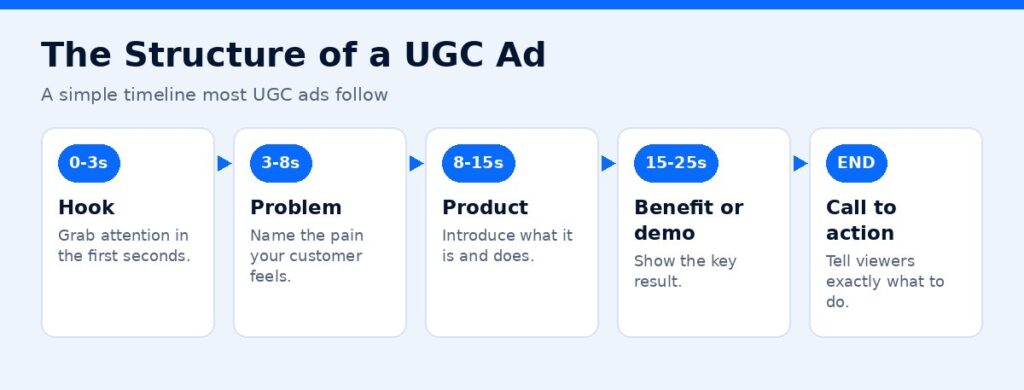
Most UGC ads follow a simple structure:
- Hook (0 to 3 seconds)
- Problem (3 to 8 seconds)
- Product introduction (8 to 15 seconds)
- Key benefit or demo (15 to 25 seconds)
- Call to action (last few seconds)
Keep sentences short and conversational. Read it out loud; if it sounds like an advertisement, rewrite it.
Step 5: Choose your AI UGC tool
Look for a tool that offers realistic avatars, product-in-hand or product-wearing shots, multiple languages, the aspect ratios you need, and no watermark on export. Tagshop AI is one example built specifically for AI UGC video ads. Its pricing page (checked November 1, 2026) lists features including 300+ AI avatars, 200+ video ad templates, 75+ languages, URL to video, an AI script generator, ad cloning, and product holding or wearing videos, with export in 9:16, 16:9, and 1:1.
Affiliate link — we may earn a commission.
Step 6: Generate the first video
Upload your product images or paste your product page URL, choose an avatar that matches your audience, paste your script, and pick a voice and language. Generate a first version and watch it on your phone, the way your audience will see it.
Step 7: Edit for the feed
Add captions (many people watch without sound), keep the product visible early, cut any pauses, and end with a clear call to action. Check that text does not sit where the platform’s buttons will cover it.
Step 8: Make variations
Create several versions that change one thing at a time: the hook, the avatar, the opening shot, or the call to action. This turns your ads into a real test instead of a guess.
Step 9: Launch a small test
Run the variations with a modest budget on one platform. Look at early signals such as thumb-stop rate, hold rate, click-through rate, and cost per result.
Step 10: Scale the winners
Put more budget behind the best performers. Consider recreating the top concepts with real customers or creators to add genuine proof, and keep refreshing creative before performance fades.
Metrics to Watch When Testing
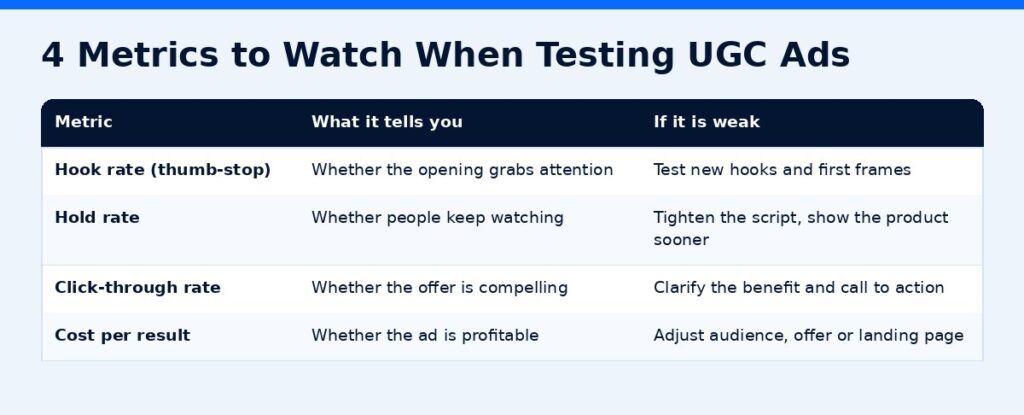
| Metric | What it tells you | What to change if it is weak |
|---|---|---|
| Thumb-stop / hook rate | Whether the opening grabs attention | Test new hooks and first frames |
| Hold rate | Whether people keep watching | Tighten the script, show the product sooner |
| Click-through rate | Whether the offer is compelling | Clarify the benefit and call to action |
| Cost per result | Whether the ad is profitable | Adjust audience, offer, or landing page |
Judge each variation on the same metric and give it enough spend to be meaningful before deciding.
AI UGC Script Template
Copy and adapt this:
Hook: “If you [problem], watch this.”
Problem: “I used to [frustrating situation]. Nothing I tried worked.”
Product: “Then I found [Product]. It [what it does in one line].”
Benefit: “Now [specific, realistic benefit].”
CTA: “Tap the link to [action].”
Only use first-person lines like these when they reflect real customer experiences, or rewrite them in a demonstration style. More on that below.
Disclosure and Honesty Rules
This is the part many brands get wrong. AI avatars are not real customers, so be careful how you present them.
- The FTC’s guidance on endorsements says: “Endorsements must reflect the honest opinions or experiences of the endorser” (FTC).
- Do not script an AI avatar to claim personal results it never had, or present it as a real customer.
- Base claims on real product facts and real customer feedback you can back up.
- Follow each ad platform’s rules on AI-generated content and labeling.
- Avoid medical, financial, or income claims unless you have proper evidence.
Safer formats for AI presenters include product demos, explainer videos, “three tips” content, and reading out real reviews with permission and clear attribution.
Tagshop AI Pricing at a Glance
On November 1, 2026, Tagshop AI’s pricing page listed these annual plans:
| Plan | Price (paid annually) | Credits per year | Videos (up to) |
|---|---|---|---|
| Starter | $14/month | 600 | 60 |
| Growth | $39/month | 1,800 | 180 |
| Pro | $79/month | 3,600 | 360 |
The page also showed a limited-time offer on yearly plans and an API plan by demo. Monthly billing costs more, so check the Tagshop AI pricing page for current offers.
Common Mistakes With AI UGC Ads
- Using an avatar that does not match your target customer
- Long intros before the hook
- Product not visible until late in the video
- No captions
- Testing many changes at once, so you cannot tell what worked
- Over-polished visuals that no longer feel like UGC
- Claims an AI presenter cannot honestly make
Want Help With Social Ads?
AI tools make it easier to produce creative, but strategy, targeting, and testing still decide whether ads make money. ScaleMyClick runs social media marketing for small businesses. Get a free marketing audit.
Affiliate link — we may earn a commission.
Related guides
- AI Video Generator for Business: How to Pick One in 2026
- Synthesia Pricing 2026: Plans, Minutes and Which to Choose
- How to Repurpose Content Across Platforms (Without Extra Hours)
- Marketing Tools & Resources (our recommended tools)
FAQs
What are UGC ads?
UGC ads are short, authentic-looking videos that resemble content made by real customers or creators, often used on TikTok, Instagram, and Facebook.
Can AI really make UGC ads?
Yes. AI tools can generate scripts, avatars, voiceovers, and product videos in UGC style. Results are best when you start with real customer insights and test several versions.
Are AI UGC ads allowed on social platforms?
Generally yes, but platforms have their own policies on AI-generated content and disclosures. Always check the current rules for each platform you advertise on.
How long should a UGC ad be?
Many UGC ads are short, often under a minute, with the hook in the first few seconds. Test different lengths for your product.
Do I still need real creators?
AI is great for fast testing. Many brands use AI to find winning angles, then work with real customers or creators to add genuine testimonials.
Sources
- Tagshop AI pricing (checked November 1, 2026)
- FTC: Endorsement Guides, What People Are Asking
This contains an affiliate link.

