

Google Business Profile posts are short updates — news, offers and events — that you publish on your Business Profile so customers see them on Google Search and Maps. They are free, take a few minutes to create, and give people who are already looking at your business a reason to call, book or visit.
This guide covers the three post types, real examples you can copy, best practices from Google’s own guidelines, and what to do when your Google Business Profile posts are not showing.
What are Google Business Profile posts?
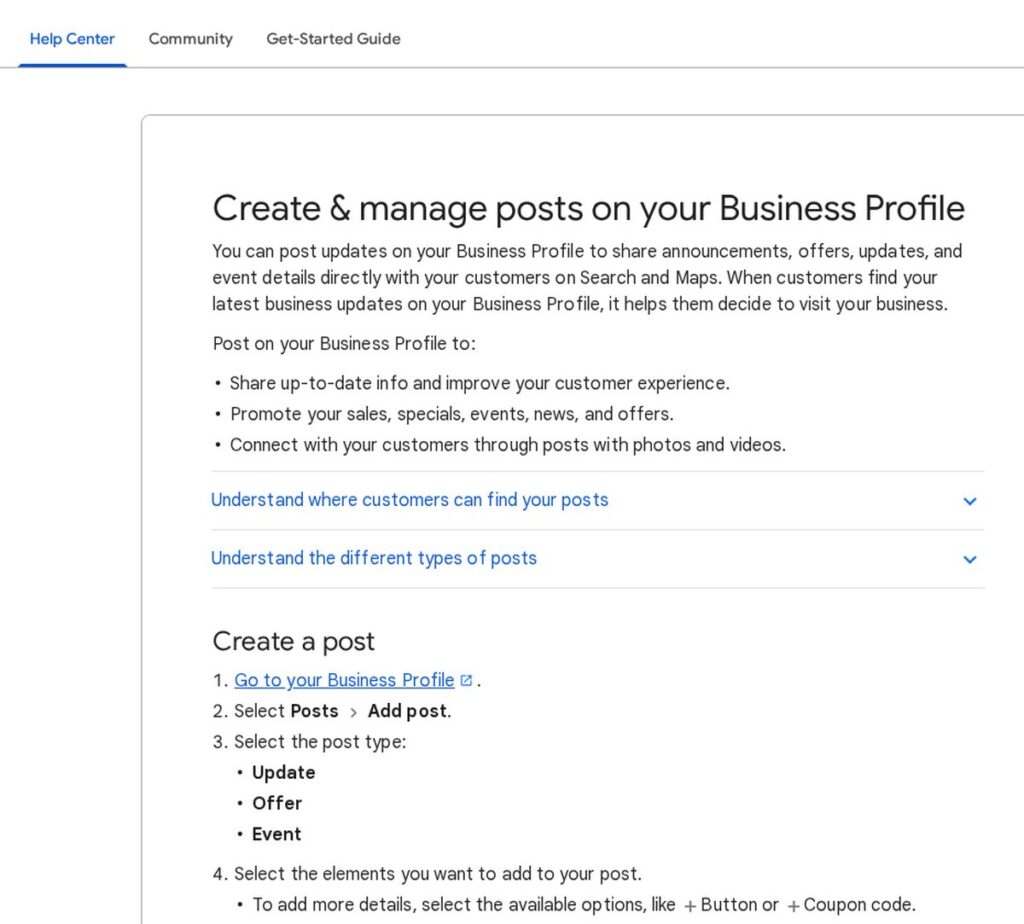
According to Google’s help page on posts, you can post updates on your Business Profile to share announcements, offers, updates and event details directly with customers on Search and Maps. Posts can include photos and videos, and you can add details like a button or a coupon code.
Think of posts as the “what’s new” section of your listing. Your reviews, hours and photos tell people who you are. Posts tell them why to act now.
The three types of Google Business Profile posts
| Post type | Best for | What to include |
|---|---|---|
| Update | News, tips, new services, behind-the-scenes, seasonal reminders | A clear first line, a photo or short video, and a button such as Book or Learn more |
| Offer | Discounts, limited-time deals, first-visit promotions | Offer title, start and end dates, coupon code if any, and terms |
| Event | Workshops, open houses, classes, sales events | Event title, start and end date and time, and how to attend |
How to create a post
- Go to your Business Profile.
- Select Posts, then Add post.
- Choose Update, Offer or Event.
- Add your text, photo or video, and options like a button or coupon code.
- Optionally turn on Schedule this post to publish later, or use the Repeats menu to post weekly, monthly or on a custom schedule.
- Select Post. If you manage several locations, you can share the same post to multiple profiles.
These steps follow Google’s current instructions; the menu wording may change slightly over time.
Google Business Profile posts examples
Here are Google Business Profile posts examples you can adapt. Keep each one short and specific.
Update examples
- HVAC company: “Furnace season is here. Book a tune-up before the first cold snap — weekday slots open this month.” Button: Book.
- Dental office: “Now offering Saturday appointments for cleanings and checkups.” Button: Call now.
- Restaurant: “Our fall menu is live: three new soups and a pumpkin dessert. See the menu.” Button: Learn more.
- Marketing agency: “New guide: 5 fixes for a website that gets traffic but no calls.” Button: Learn more.
Offer examples
- Auto repair: “Oil change special for first-time customers, valid through the end of the month.” Add the code and terms.
- Salon: “Book a cut and color on weekdays and get a free deep-conditioning treatment.”
- Retail shop: “Show this post at checkout for a holiday gift-wrap upgrade.”
Event examples
- Gym: “Free intro class this Saturday at 9 AM — bring a friend.”
- Bookstore: “Local author signing, Thursday 6–8 PM.”
- Real estate office: “Open house this Sunday, 1–4 PM.”
Google Business Profile posts best practices
Google’s help page lists several tips for better posts. Combined with what works for local businesses, here are the Google Business Profile posts best practices to follow:
- Keep it professional. Google advises avoiding misspelled words, extra characters, text that adds no value, and auto-generated or distracting content.
- Lead with the point. Put the offer, date or news in the first sentence so it reads well in a short preview.
- Use a real photo. Your team at work, your storefront or your product beats stock images.
- Add complete details. Google recommends a descriptive title, event start and end times, and offer info.
- Always add a button. Book, Call, Learn more or Order online turns interest into action.
- Link only to trusted pages. Google blocks links that lead to malware, phishing or other harmful material.
- Check regulated-industry rules. Google says businesses in regulated industries (for example alcohol, tobacco, pharmaceuticals, gambling, weapons and financial services) can use posts but should not include content about those products.
- Post on a rhythm. Use scheduled and repeating posts so your profile always shows something current.
- Track what works. Use UTM tags on your links so you can see post traffic in Google Analytics.
Posts support your wider local SEO work. For the bigger picture, read our Google SEO guide for 2026.
Google Business Profile posts not showing? Check these causes
After you publish, Google reviews each post against its content policy. Google’s help page lists three statuses:
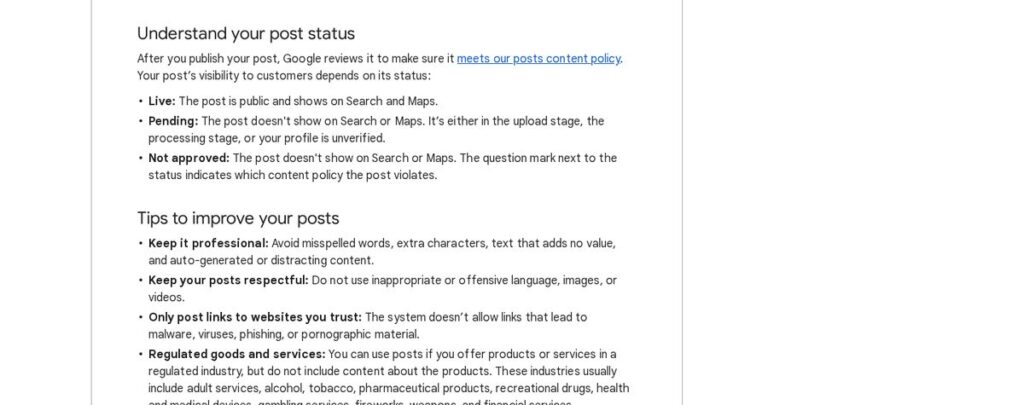
- Live: the post is public and shows on Search and Maps.
- Pending: the post is not showing yet. It is still uploading or processing, or your profile is unverified.
- Not approved: the post does not show. A question mark next to the status shows which content policy it breaks.
If your Google Business Profile posts are not showing, work through this checklist:
- Confirm your profile is verified.
- Wait for processing to finish, then check the status again.
- If it says Not approved, read the policy note, edit the post and resubmit.
- Fix whatever the policy note points to — usually the wording, the link or the image — and resubmit.
- Check that Offer and Event dates are correct and still current.
A simple template for posts that get clicks
When you are stuck, use this four-part template for any Update or Offer:
- Hook: one short line with the news or the benefit (“Same-week AC repairs are open again”).
- Detail: one or two sentences on what it is, who it is for and any dates.
- Proof or reason: a real detail that builds trust, such as years in business, a service area or a recent project photo.
- Action: a button that matches the goal — Book, Call now, Order online or Learn more.
Keep the whole post short enough to read in a few seconds, and pair it with a clear, well-lit photo of your own work or location.
How often should you post?
Google does not set a required frequency. A practical rhythm for most local businesses is one Update a week plus Offers and Events whenever you have them. The repeat-posting option makes this easier: you can schedule a recurring “book your seasonal service” reminder once and let it run.
If keeping your profile active falls to the bottom of the list, our local SEO services include Business Profile management.
Related guides
- How to Generate Leads for a Small Business: 15 Proven Ways
- Landing Page Best Practices for 2026: 14 Rules That Lift Conversions
- SMS Marketing for Small Business: Rules, Ideas and Tools
Google Business Profile posts FAQ
How do I see Google Business Profile posts?
Search for your business on Google or open it in Google Maps. Posts appear on your Business Profile alongside your photos, reviews and hours. In your own profile manager, select Posts to see each post and its status.
Can you make posts on your Google Business Profile?
Yes. Any verified business can create Update, Offer and Event posts from the Business Profile on Search or Maps. You can also schedule posts and set them to repeat.
What should I post on my Google Business Profile?
Post what helps a customer decide: new services, seasonal reminders, current offers, upcoming events, answers to common questions and real photos of recent work. Each post should end with a clear button.
Why is my Google Business Profile post pending?
According to Google, a post shows as Pending while it is uploading or processing, or when the profile is unverified. If it stays pending, check that your profile is verified.
Make your Business Profile work harder
Posts are one of the easiest ways to stand out in local search, and they only take minutes. If you want a full review of your Google Business Profile, reviews and local rankings, get a free marketing audit.

