

How to build an email list from scratch comes down to four steps: pick an email platform, create a simple reason for people to sign up, put a sign-up form wherever your customers already are, and send something useful soon after they join. You do not need a big audience or even a website to start.
Below is a practical, step-by-step plan for small businesses, including free options, ways to collect emails without a website, and the rules you need to follow so your list stays clean and legal.
Why build an email list at all?
Social media reach depends on someone else’s algorithm. An email list is an audience you own. When you have something to say — a new service, an opening in your schedule, a seasonal offer — you can reach the people who already raised their hand.
An email list also makes every other marketing channel work harder. Visitors from ads, social posts and search who are not ready to buy today can join your list and hear from you again.
How to build an email list in 7 steps
Step 1: Choose an email marketing platform
Do not send marketing emails from your personal inbox. A dedicated platform gives you sign-up forms, unsubscribe links, templates and reports, and it helps you follow the rules automatically.
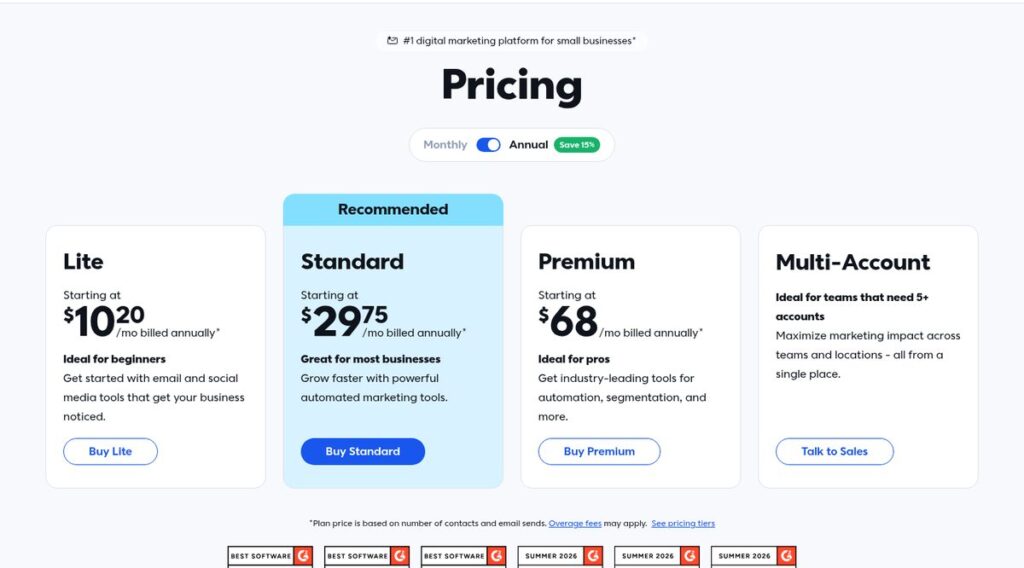
Two common choices for small businesses are Constant Contact and Omnisend. Constant Contact focuses on email, SMS and social tools for small businesses and offers a free trial. Omnisend is popular with ecommerce stores and has a free plan.
Affiliate link — we may earn a commission.
Affiliate link — we may earn a commission.
Step 2: Decide what people get for signing up
“Join our newsletter” is not a reason. Offer something specific: a checklist, a short guide, a discount on the first order, early access to bookings, or a monthly tips email for your industry. The best offers solve one small problem your ideal customer already has.
Step 3: Create a simple sign-up form
Ask for as little as possible — usually just an email address and first name. Say clearly what people will receive and how often. Most platforms let you build a pop-up, embedded or full-page form without code.
Step 4: Put the form everywhere customers already are
- Your website header, footer and blog posts
- Your Google Business Profile and social media bios
- Your email signature and invoices
- A QR code at your counter, on receipts or on printed flyers
- The checkout page if you sell online
Step 5: Send a welcome email right away
Set up an automatic welcome email that delivers what you promised, introduces your business and tells people what to expect next. New subscribers are paying the most attention in the first few days, so do not wait for your next newsletter.
Step 6: Send consistently
Pick a schedule you can keep — weekly, every two weeks or monthly — and stick to it. Mix helpful content with occasional offers so people stay subscribed.
Step 7: Clean your list regularly
Remove addresses that bounce and people who have not opened anything in a long time. A smaller, engaged list protects your sender reputation. Google’s email sender guidelines recommend making sure recipients opt in and confirming each address before subscribing them.
How to build an email list for free
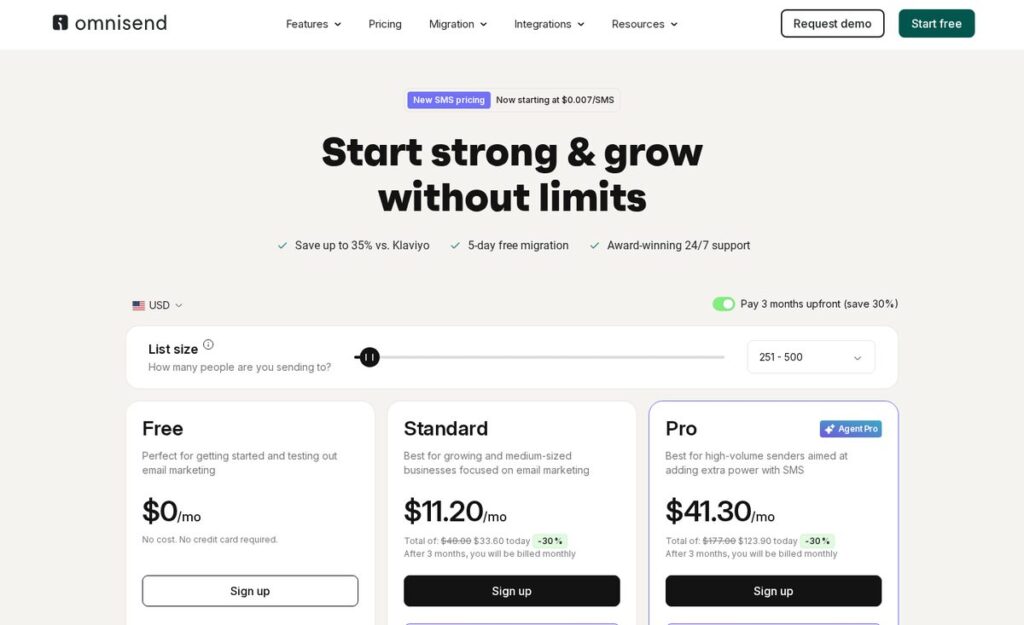
You can start without paying anything. Omnisend’s pricing page shows a Free plan at $0/mo with 500 emails per month and 250 contacts, and says free users can use forms, automations and segmentation, as of November 2026. Prices change; check the official Omnisend pricing page.
Other free building blocks include a free lead magnet you write yourself, a free QR code that points to your form, and your existing social profiles. Paying becomes worth it when your list outgrows the free limits or you need more sending volume.
| Platform | Free option | Paid plans (as of November 2026) | Good fit for |
|---|---|---|---|
| Constant Contact | Free trial | Lite from $10.20/mo, Standard from $29.75/mo, Premium from $68/mo, billed annually; price based on contacts | Local and service businesses that want email, SMS and social in one place |
| Omnisend | Free plan: 500 emails/mo, 250 contacts | For a 500-contact list: Standard $16/mo, Pro $59/mo (30% off if paid 3 months upfront); price based on list size | Ecommerce stores and shops that want email plus SMS |
Prices change often; always confirm on the vendor’s pricing page before you buy.
How to build an email list without a website
No website yet? You can still grow a list:
- Hosted sign-up pages: many email platforms give you a hosted form or landing page with its own link that you can share anywhere.
- Social media: put that link in your Instagram, Facebook, TikTok and LinkedIn bios. Omnisend’s site currently promotes a “Social Capture” feature for collecting emails from Instagram followers.
- In person: a QR code on the counter, a sign-up tablet at events, or a paper sheet with a clear opt-in line (“Yes, email me updates and offers”).
- Google Business Profile: link to your sign-up page in posts and offers.
- Partnerships: co-host a giveaway or workshop with a non-competing local business and collect opt-ins.
When you are ready for a site, a simple, fast website with a sign-up form on every page makes list building much easier. Our website design team builds sites with this in mind.
Rules to follow when you build an email list
Email marketing in the US is covered by the CAN-SPAM Act. According to the FTC’s CAN-SPAM compliance guide, commercial emails must not use false or misleading header information or deceptive subject lines, must give recipients a way to opt out, and opt-out requests must be honored within 10 business days. The FTC says each separate email in violation can bring penalties of up to $53,088.
Inbox providers have their own rules too. Google’s sender guidelines require all senders to set up SPF or DKIM, and bulk senders (5,000 or more messages a day to Gmail) to use SPF, DKIM and DMARC and support one-click unsubscribe. A good email platform handles most of this for you. This is not legal advice; check the official sources or talk to a lawyer for your situation.
Two habits keep you safe: never buy email lists, and only add people who asked to hear from you.
Related guides
- Omnisend Pricing 2026: Plans, Contacts and SMS Costs Explained
- How to Warm Up an Email Domain (and How Long It Takes)
- Cold Email Templates That Get Replies: 10 Examples for Small Businesses
- Constant Contact vs Mailchimp: Which Is Better for Small Business?
How to build an email list FAQ
Can you build an email list for free?
Yes. Start with a free plan from an email platform, a free lead magnet you create yourself, and sign-up links on your social profiles and Google Business Profile. Upgrade when you outgrow the free limits.
What is the best way to build an email list?
Offer a specific, useful reason to join, keep the form short, and place it everywhere your customers already see you — website, social bios, receipts and in person. Then send a welcome email immediately so new subscribers stay engaged.
How can I generate an email list?
Collect addresses from people who opt in: website forms, checkout pages, events, social media links and QR codes. Do not buy or scrape lists; it hurts deliverability and can break anti-spam rules.
How many emails should I send to my list?
Send as often as you can stay consistent and useful. For most small businesses that is between once a week and once a month. Watch unsubscribes and opens; if they get worse, slow down or improve the content.
Start your list this week
Pick a platform, write one simple offer and put a sign-up link in three places this week. If you want a plan for turning your website, ads and social profiles into steady list growth, get a free marketing audit. We can also help through our SEO services so more of the right people find your sign-up offer.

