

Constant Contact vs Mailchimp comes down to support, simplicity and how your costs grow. Constant Contact includes live phone and chat support on every plan and starts at $12/month. Mailchimp has a free plan for under 250 contacts and paid plans starting at $13/month (Essentials) and $20/month (Standard), as of November 2026. For many small, local businesses Constant Contact is the simpler pick; Mailchimp suits teams that want a free starting point and more automation room on Standard.
Below is a side-by-side comparison of pricing, features, SMS, support and ease of use, using what each company’s official pricing page showed on November 3, 2026.
Constant Contact vs Mailchimp at a Glance
| Constant Contact | Mailchimp | |
|---|---|---|
| Free plan | No (free trial with no credit card; 30-day money-back policy on new plans) | Yes, for under 250 contacts |
| Entry paid plan | Lite from $12/month | Essentials from $13/month |
| Mid plan | Standard from $35/month | Standard from $20/month |
| Top plan | Premium from $80/month | Premium from $350/month (offer: $297.50/month for 12 months) |
| Monthly email sends | 10x / 12x / 24x contacts (Lite / Standard / Premium) | 10x / 12x / 15x contacts (Essentials / Standard / Premium) |
| SMS | Add-on from $10/month on Lite and Standard; 500 messages included on Premium | SMS (and MMS on higher plans) as an add-on |
| Support | Live phone and chat support on every plan | 24/7 email and chat on Essentials and Standard; phone and priority on Premium |
| Best for | Local businesses that want help and simplicity | Growing teams that want a free start and more automation |
All prices are starting prices for the smallest contact tier and rise with list size. Prices change; check the Constant Contact pricing page and the Mailchimp pricing page before you decide.
Pricing: Constant Contact vs Mailchimp
Constant Contact pricing
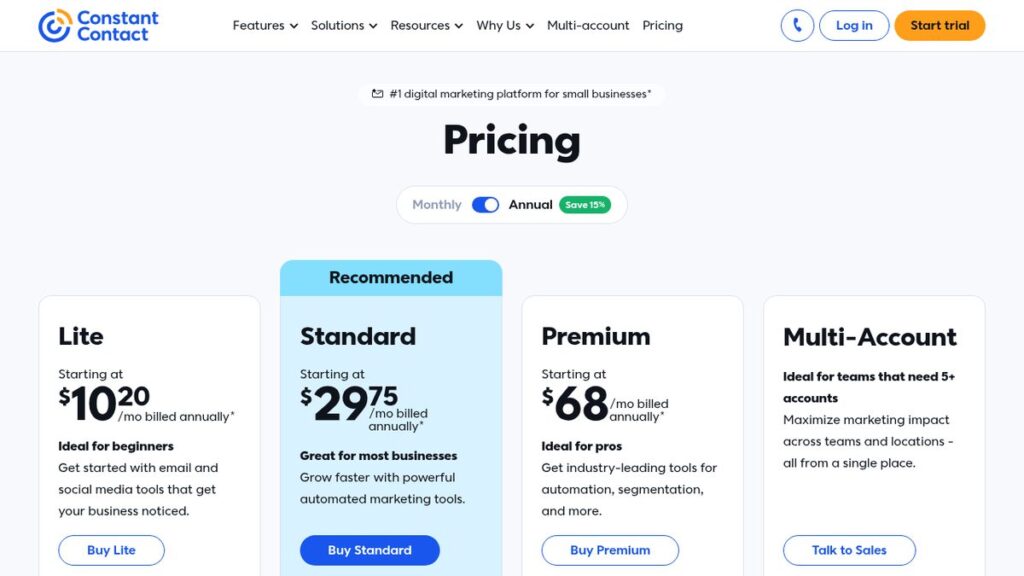
Constant Contact has three plans, priced by contact count: Lite (starting at $12/month), Standard (starting at $35/month) and Premium (starting at $80/month). Prepaying for 12 months saves up to 15%, which brings starting prices to $10.20, $29.75 and $68 per month. If you go over your monthly send limit, emails still go out and extra sends are billed at $0.002 each. New plans come with a 30-day money-back policy.
Mailchimp pricing
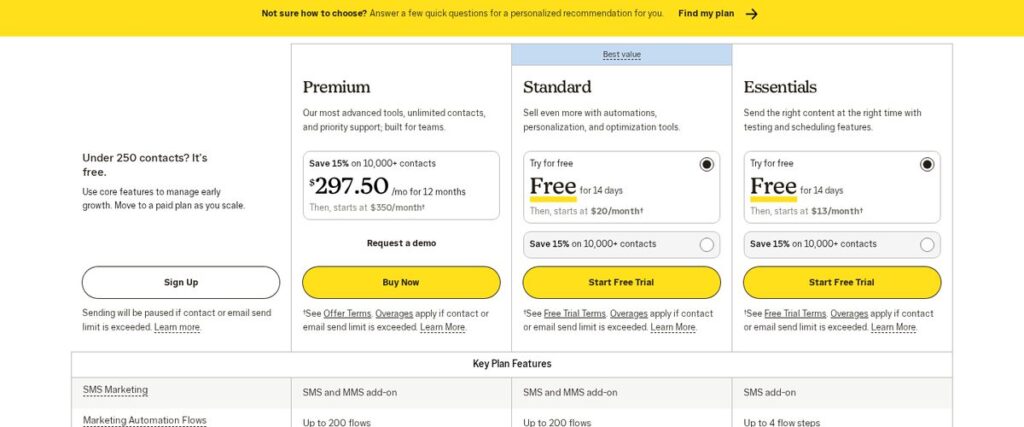
Mailchimp offers a free plan for audiences under 250 contacts. Paid plans start at $13/month for Essentials, $20/month for Standard and $350/month for Premium, with Premium shown at $297.50/month for the first 12 months during the current offer. Standard and Essentials come with a 14-day free trial, and Mailchimp notes that overages apply if you exceed contact or send limits, or sending is paused on the free plan.
On price alone, Mailchimp’s free plan and $20 Standard plan look cheaper at the start. Constant Contact’s Premium plan, on the other hand, starts far below Mailchimp Premium. Run the numbers at your actual list size on both pages before deciding.
Features Compared
Email building and templates
Both platforms include drag-and-drop email builders, pre-built templates and scheduling. Mailchimp’s comparison table lists popup forms, email scheduling and branding removal on all paid plans, with branded templates, custom reports and dynamic content on Standard and above. Constant Contact’s Standard plan adds email scheduling, subject line A/B testing, automatic resend to non-openers and contact-level reporting.
Automation
Mailchimp lists up to 200 automation flows on Standard and Premium, but only up to 4 flow steps on Essentials, so serious automation users will likely need Standard. Constant Contact includes automations as well, with more advanced options on its higher plans.
SMS marketing
Constant Contact customers on Lite or Standard can add SMS starting at $10/month for up to 500 messages, and Premium includes 500 messages. Mailchimp sells SMS as an add-on, with MMS also listed on Standard and Premium. If text messages are central to your marketing, compare the per-message cost at your volume on both pages.
Users and audiences
Mailchimp’s table shows 3 seats on Essentials, 5 on Standard and unlimited on Premium, plus limits on separate audiences. If several people on your team need their own logins, factor that in.
Affiliate link — we may earn a commission.
Support and Ease of Use
Support is one of the clearest differences. Constant Contact says live phone and chat support from real people is included on every plan. Mailchimp offers 24/7 email and chat support on Essentials and Standard, with phone and priority support reserved for Premium.
For a busy owner who wants to call someone when a campaign looks wrong, that difference can matter more than a few dollars a month.
Switching From One Platform to the Other
If you are already on one platform and thinking about moving, plan the switch so you do not lose subscribers or hurt deliverability:
- Export your contacts with their subscription status and any tags or custom fields.
- Only import people who opted in; leave out unsubscribes and hard bounces.
- Rebuild your most important automations first, such as the welcome series and abandoned-form follow-ups.
- Authenticate your sending domain (SPF, DKIM and DMARC) on the new platform before your first campaign.
- Send your first few campaigns to your most engaged contacts, then widen to the full list.
- Keep the old account open until you have confirmed every form on your website points to the new one.
Both companies have help centers that cover imports, and Constant Contact includes live phone support on every plan if you get stuck.
Which Should You Choose?
| Choose Constant Contact if… | Choose Mailchimp if… |
|---|---|
| You want phone support on any plan | You want a free plan to start |
| You run a local business, nonprofit or service company | You plan to build multi-step automations on Standard |
| You want SMS on a lower-tier plan | Your team is comfortable with self-serve help |
| You prefer a simpler setup | You already use tools that connect to Mailchimp |
Not sure email is the only tool you need? Our guide to the best digital marketing tools for small businesses covers email platforms alongside CRMs and automation, and our HighLevel review looks at an all-in-one option that includes email and SMS.
Affiliate link — we may earn a commission.
Related guides
- Omnisend Pricing 2026: Plans, Contacts and SMS Costs Explained
- Marketing Automation for Small Business: Where to Start
- How to Build an Email List From Scratch (Even Without a Website)
Constant Contact vs Mailchimp FAQ
Should I use Mailchimp or Constant Contact?
Pick Constant Contact if you value live phone support on every plan and a simple setup. Pick Mailchimp if you want to start free with a small list or need its automation flows on the Standard plan. Compare both at your real contact count.
Why are people leaving Mailchimp?
People switch email platforms for different reasons, most often cost as their list grows, the support level included on their plan, or a need for features like SMS on a lower tier. Compare pricing at your list size before moving.
Who is Mailchimp’s biggest competitor?
Mailchimp has many competitors. Constant Contact is one of the most commonly compared, along with platforms such as Omnisend for ecommerce and all-in-one tools that bundle email with a CRM.
Is Constant Contact easier to use than Mailchimp?
Both are designed for non-technical users. Constant Contact’s included phone and chat support can make it easier for beginners to get unstuck, while Mailchimp leans more on self-serve resources on its lower plans.
Get Expert Help With Email Marketing
Choosing the platform is step one; list growth, automations and content are where results come from. Get a free marketing audit from ScaleMyClick, or ask us about AI automation for follow-up emails and texts.

