

Looking for real AI automation examples for small business, not vague promises? This list covers 15 practical workflows that owners and small teams use to save time, respond faster, and stop leads from slipping through the cracks. Each one includes what it does, who it suits, and what you need to set it up.
You do not need to automate everything at once. Pick one or two that solve your biggest bottleneck, get them working, then add more.

What Counts as AI Automation?
Traditional automation follows fixed rules: “when a form is submitted, send this email.” AI automation adds a layer that can understand language, make simple decisions, and generate content. For example, it can read an incoming email, work out what the person wants, draft a reply, and route it to the right person.
The best AI workflow automation examples combine both: reliable rules for the steps that must always happen, and AI for the parts that need understanding or writing.
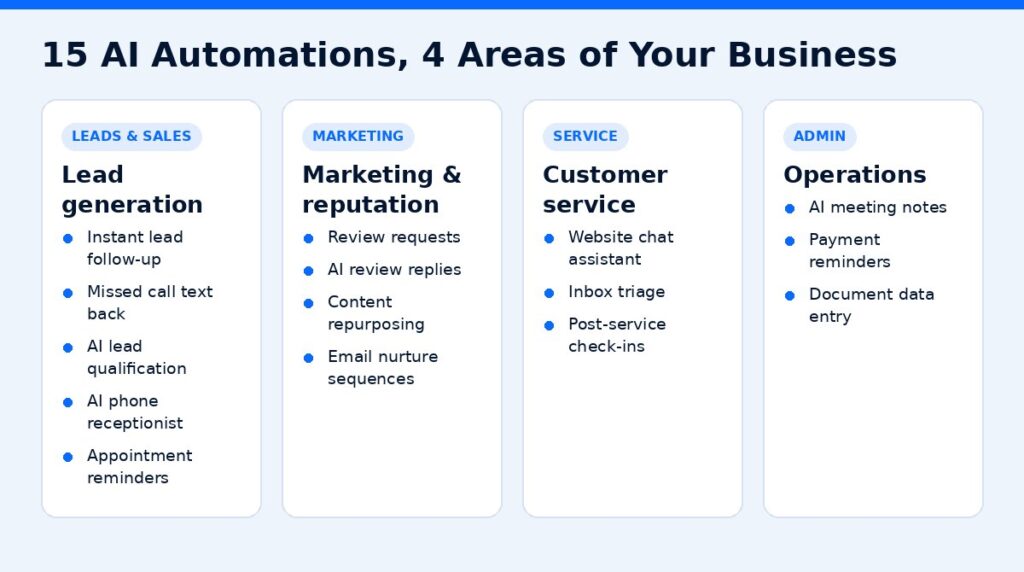
Lead Generation and Sales
1. Instant lead follow-up
What it does: when someone fills out a form on your website, an automation sends a personalized text and email within moments, asks a qualifying question, and offers a booking link.
Good for: any business that gets enquiries through its website or ads.
What you need: a CRM with SMS and email, connected to your website forms.
2. Missed call text back
What it does: when you miss a call, the caller automatically gets a text so the conversation continues. It is one of the simplest automations with a clear payoff.
Good for: contractors, clinics, salons, and anyone who is often away from the phone.
3. AI lead qualification
What it does: an AI assistant asks new leads a few questions by chat or text (service needed, location, timeline, budget range) and scores or tags them before a person follows up.
Good for: businesses that get many enquiries but only some are a good fit.
4. AI phone receptionist
What it does: an AI voice agent answers calls, handles common questions, and books appointments, with hand-off to a person for complex calls.
Good for: businesses with high call volume or lots of after-hours calls.
5. Automated appointment reminders
What it does: sends confirmations and reminders by text and email, and lets customers confirm or reschedule with a reply.
Good for: any appointment-based business that struggles with no-shows.
Platforms like GoHighLevel combine CRM, texting, calendars, and voice AI in one place, which makes several of the automations above easier to connect.
Affiliate link — we may earn a commission.
Marketing and Reputation
6. Review requests after every job
What it does: when a job is marked complete, the customer gets a thank-you text with a link to leave a Google review. A reminder goes out if they do not respond.
Good for: local businesses that rely on Google Maps visibility.
7. AI-assisted review replies
What it does: AI drafts a personalized response to each new review for you to approve and post. You stay in control while saving time.
Good for: businesses with steady review volume.
8. Content repurposing
What it does: turns one long piece of content, like a blog post, video, or webinar, into social posts, email snippets, and short captions, ready for you to edit.
Good for: owners who know they should post more but never have time.
9. Email nurture sequences
What it does: new subscribers or leads receive a series of helpful emails over several weeks. AI can help draft the sequence and personalize subject lines based on the lead’s interest.
Good for: businesses with longer decision times, like home renovation, B2B services, or high-ticket offers.
Customer Service
10. AI chat assistant on your website
What it does: answers common questions using your own FAQ and service information, collects contact details, and passes complex questions to your team.
Good for: businesses that get the same questions again and again.
11. Inbox triage
What it does: AI reads incoming emails, labels them (new lead, invoice, support, spam), drafts replies for common requests, and flags anything urgent.
Good for: owners who spend the first hour of each day sorting email.
12. Post-service check-ins
What it does: a few days after a job or purchase, the customer gets a message asking if everything is okay. Negative replies alert you right away so you can fix the issue before it becomes a bad review.
Good for: service and retail businesses that want repeat customers.
Operations and Admin
13. AI meeting notes
What it does: an AI note taker joins your calls, transcribes them, and produces a summary with action items, so nothing gets lost after a sales call or client meeting.
Good for: consultants, agencies, and anyone who runs regular client calls. Fireflies.ai is one popular option.
Affiliate link — we may earn a commission.
14. Invoice and payment reminders
What it does: sends polite reminders before and after an invoice is due, and updates your records when payment arrives.
Good for: businesses that spend too much time chasing payments.
15. Document and data entry
What it does: AI pulls information from forms, emails, receipts, or PDFs and enters it into your CRM, spreadsheet, or accounting tool.
Good for: any business with repetitive copy-and-paste work.
AI Automation Examples at a Glance
| # | Automation | Main benefit | Difficulty |
|---|---|---|---|
| 1 | Instant lead follow-up | Faster response to new leads | Easy |
| 2 | Missed call text back | Recover missed callers | Easy |
| 3 | AI lead qualification | Focus on best-fit leads | Medium |
| 4 | AI phone receptionist | Answer every call | Medium |
| 5 | Appointment reminders | Fewer no-shows | Easy |
| 6 | Review requests | More Google reviews | Easy |
| 7 | AI review replies | Save time, stay consistent | Easy |
| 8 | Content repurposing | More content from less work | Medium |
| 9 | Email nurture | Warm up slower leads | Medium |
| 10 | Website chat assistant | Answer questions 24/7 | Medium |
| 11 | Inbox triage | Less time on email | Medium |
| 12 | Post-service check-ins | Catch problems early | Easy |
| 13 | AI meeting notes | Clear follow-ups | Easy |
| 14 | Payment reminders | Faster payments | Easy |
| 15 | Document data entry | Less manual work | Medium |
How to Choose Your First AI Automation
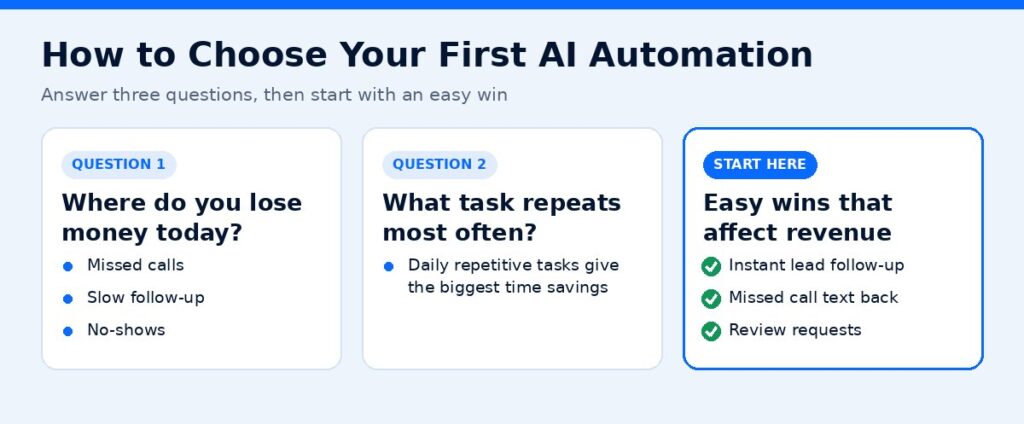
Use these three questions:
- Where do you lose money today? Missed calls, slow follow-up, and no-shows are common answers.
- What task repeats most often? Daily repetitive tasks give the biggest time savings.
- What tools do you already use? Starting with your existing CRM or email platform is faster than adding new software.
For most small businesses, the best starting points are instant lead follow-up, missed call text back, and review requests. They are easy to set up and directly affect revenue.
Tips for Using AI Responsibly
- Keep a person in the loop for anything customer-facing until you trust the output.
- Feed AI accurate information. It should never guess prices, policies, or availability.
- Be transparent when customers are talking to an AI assistant.
- Protect customer data and check where your tools store it.
- Review results monthly and adjust.
Want Help Building These?
ScaleMyClick designs and builds AI automations for small businesses, from lead follow-up and AI receptionists to review systems and CRM workflows. See our AI automation solutions, and if you want more leads flowing into those automations, explore our Google Ads management service.
Get a Free Marketing Audit
Not sure whether your current website is helping or hurting? ScaleMyClick offers a free marketing audit for small businesses. You get a plain-English look at your site, your search visibility, and where leads are slipping away, plus a short list of fixes in priority order.
This contains an affiliate link.
Related guides
- Best AI Tools for Small Business Owners in 2026
- Speed to Lead: Why Fast Follow-Up Wins More Customers
- AI Answering Service for Small Business: Is It Worth It?
- Marketing Tools & Resources (our recommended tools)
FAQs
What is the easiest AI automation for a small business to start with?
Instant lead follow-up and missed call text back are usually the easiest. They use tools many businesses already have and have a clear, measurable benefit.
Do I need technical skills to set up AI automation?
Not always. Many CRMs and automation platforms offer templates. More complex workflows, like AI phone agents or custom integrations, are easier with help from someone experienced.
Will AI automation replace my staff?
For most small businesses, AI automation takes over repetitive tasks so your team can spend more time on customers and skilled work. It works best as support, not replacement.
How much does AI automation cost?
It depends on the tools and how much setup you need. Many platforms charge a monthly subscription, and some add usage-based fees. Check current pricing on each vendor’s website.
Is AI automation safe for customer data?
It can be, if you choose reputable tools and review their security and privacy policies. Limit access to sensitive data and check any industry-specific requirements.

