

When someone near you searches “dentist near me” or “roof repair Tampa,” Google decides in a split second which businesses to show. This local SEO checklist for small businesses walks you through every step that influences that decision, in the order that usually brings results fastest. Print it, work through it, and tick items off.
You do not need to be technical to complete most of it. Set aside a few hours for the first pass, then revisit it every quarter.
How Google Ranks Local Businesses
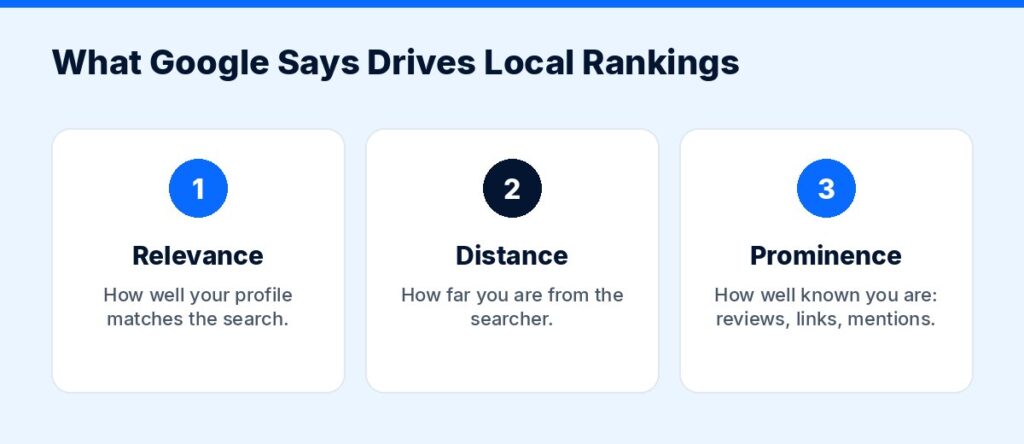
Google says local results are mainly based on relevance (how well your profile matches the search), distance (how far you are from the searcher or the location in the search) and prominence (how well known your business is, including reviews, links and articles). You can read this directly in Google’s own help article, Tips to improve your local ranking on Google.
You cannot change your distance from a searcher. Everything on this checklist improves relevance and prominence.
Part 1: Google Business Profile Checklist
Your Google Business Profile (GBP) is the single most important local SEO asset you have. It is what appears in the map pack and on Google Maps.
- Claim and verify your profile. Google offers several verification methods; follow the steps in Google’s verification guide.
- Use your real business name. Do not stuff in keywords or city names that are not part of your real name; Google’s guidelines ask for the name you use in the real world, and keyword stuffing can get a profile suspended.
- Choose the most accurate primary category, then add secondary categories that truly match services you offer.
- Enter your address (or set a service area if you visit customers and do not serve them at your location).
- Add your phone number, website URL and accurate opening hours, including holiday hours.
- Write a clear business description that explains what you do, who you serve and where.
- List your products and services with short descriptions.
- Upload real photos: storefront, team, vehicles, work you have done. Add new photos regularly.
- Turn on messaging only if someone will answer quickly.
- Publish updates (offers, events, news) on your profile so it stays active.
- Answer every review, positive and negative, politely and promptly.
Part 2: NAP Consistency and Citations
NAP stands for Name, Address, Phone. Search engines compare your details across the web. Mismatches (an old address, a different phone number, “St.” vs “Street” in some places and a suite number missing in others) create confusion.
- Decide on one exact format for your name, address and phone number, and use it everywhere.
- Update your details on major platforms: Apple Business Connect, Bing Places, Facebook, Yelp and your industry’s main directories.
- Check your local chamber of commerce and trade associations for listings.
- Search for your old addresses and phone numbers and fix any outdated listings you find.
- Remove duplicate Google Business Profiles if you find them.
Doing this by hand works for one location. For several locations, a listing management tool can push your details to many directories at once. Semrush, for example, offers a local toolkit with listing management; check its current features and pricing before you buy.
Affiliate link — we may earn a commission.
Part 3: Reviews Checklist
Reviews feed directly into prominence, and they are often what makes a searcher choose you over the business next door.
- Create your Google review link or QR code. Google explains how in Create a Google link or QR code to request reviews.
- Ask every satisfied customer, ideally right after the job is done.
- Add the review link to receipts, follow-up emails and text messages.
- Never offer discounts, gifts or payment in exchange for reviews. Google’s own help page says this counts as fake engagement and is strictly prohibited.
- Do not filter customers so only happy ones get asked. Ask everyone.
- Reply to every review within a few days.
For scripts and templates, read our full guide on how to get more Google reviews.
Part 4: Website and On-Page Checklist
Your website is how Google confirms what you do and where. These items matter most:
- Create one page per core service (for example, “Water Heater Repair,” not just “Services”).
- If you serve several towns, create useful location pages with real local details, not copies with only the city name swapped.
- Put your city or service area naturally in page titles, headings and the first paragraph.
- Show your NAP in the footer of every page, matching your Google Business Profile exactly.
- Embed a Google Map on your contact page.
- Add LocalBusiness structured data (schema markup) with your name, address, phone and hours.
- Make the phone number tappable on mobile and the contact form short.
- Add trust signals: licenses, certifications, guarantees, real photos and customer reviews.
- Link your Google Business Profile to the most relevant page (often the homepage or a location page).
If your site is slow, outdated or hard to use on a phone, fixing that first is often the best local SEO investment. Our website design and development service builds fast, mobile-friendly sites with local SEO built in.
Part 5: Technical Basics Checklist
- Your site loads quickly on mobile. Test it with Google’s PageSpeed Insights.
- Your site uses HTTPS (the padlock in the browser).
- You have set up Google Search Console and submitted your sitemap.
- No important pages are blocked from indexing by mistake.
- There are no broken links on your main pages.
- Each page has a unique title tag and meta description.
Part 6: Local Content and Links Checklist
Prominence also comes from what others say about you online.
- Get listed by local partners, suppliers and associations you already work with.
- Sponsor a local team, event or charity and ask for a link from their site.
- Share helpful local content: guides, seasonal tips, project case studies with photos.
- Answer common customer questions in short blog posts, using the words customers actually use.
- Get mentioned in local news when you have real news (a new location, an award, a community project).
Part 7: Getting Found in AI Search
AI Overviews and AI chat tools now answer many local questions. Google’s guidance is that its generative AI features are rooted in its core Search ranking and quality systems, so the work above is the same work that helps you appear there. Clear service pages, a complete Business Profile and genuine reviews help in both places. Our explainer on GEO vs SEO covers this in more detail.
Part 8: Tracking Checklist
You cannot improve what you do not measure.
- Check your Google Business Profile performance (calls, website clicks, direction requests) every month.
- Set up conversion tracking on your website for calls and form submissions.
- Use Search Console to see which searches bring people to your site.
- Track rankings for a short list of your most valuable local keywords.
- Note the date of every major change so you can connect it to results.
Your Monthly Local SEO Routine
| Task | How often |
|---|---|
| Post an update on Google Business Profile | Weekly |
| Ask for reviews and reply to new ones | Weekly |
| Add new photos | Monthly |
| Review GBP and website performance | Monthly |
| Publish one helpful local article or project page | Monthly |
| Audit listings and NAP consistency | Quarterly |
| Re-run this full checklist | Quarterly |
Want Help With Local SEO?
This checklist covers the essentials, but it takes time to do well. If you would rather spend that time running your business, our local SEO services handle Google Business Profile optimization, citations, on-page SEO, content and monthly reporting.
Get Your Free Marketing Audit
Not sure where your next customers should come from? ScaleMyClick’s free marketing audit looks at your SEO, ads, website conversion and automation and points out 3 specific opportunities that could be limiting your growth. No pressure, no long contract talk, just a clear next step.
Related guides
- Google Business Profile Posts: Examples and Best Practices
- How to Generate Leads for a Small Business: 15 Proven Ways
- How to Get More Google Reviews for Your Business
- Marketing Tools & Resources (our recommended tools)
FAQ: Local SEO for Small Businesses
What is local SEO?
Local SEO is the work of making your business show up when people nearby search for what you offer, both in the Google map pack and in regular search results. It covers your Google Business Profile, reviews, listings, website and local links.
How long does local SEO take?
Some changes, like fixing your Business Profile category or details, can have an effect quickly. Building reviews, content and links is ongoing work that compounds over months.
Do I need a website for local SEO?
You can appear in Google Maps with only a Business Profile, but a website gives Google more information about your services and gives customers a reason to trust you. Most competitive local markets are hard to win without one.
How many Google reviews do I need?
There is no magic number. What matters is getting a steady flow of genuine reviews and having more recent, detailed reviews than the competitors you see in the map pack for your main searches.
Can I do local SEO myself?
Yes. Most items on this checklist need time more than technical skills. Many owners do the profile and reviews themselves and get help with the website, content and tracking.
This contains an affiliate link.

