


Most happy customers never leave a review. Not because they do not want to, but because nobody asked them at the right moment with an easy link. If you are wondering how to get Google reviews for your business, the answer is a simple system: a direct review link, a consistent moment to ask, and a short message that makes it effortless.
This guide covers exactly that, with templates you can copy, plus the rules from Google and the FTC that you must not break.
Why Google Reviews Matter for a Small Business
Reviews do two jobs at once:
- They help you show up. Google says prominence is one of its main local ranking factors and that “more reviews and positive ratings can help your business’s local ranking.” See Google’s article Tips to improve your local ranking on Google.
- They help you get chosen. When a searcher sees three businesses in the map pack, recent detailed reviews are often what makes them call one and not the others.
Reviews are part of a bigger local SEO picture. If you want the full list, see our local SEO checklist for small businesses.
Step 1: Get Your Google Review Link and QR Code
You need a link that takes customers straight to the review box. Google builds this for you. From Google’s help article Create a Google link or QR code to request reviews:
- Go to your Business Profile (search your business name on Google while signed in, or use Google Maps).
- Select Read reviews, then Get more reviews.
- Select Copy to copy your review link, or right-click the QR code and save the image.
Google notes that review QR codes can currently only be generated from a computer browser, not a phone. Save the link somewhere your whole team can find it.
Step 2: Pick the Right Moment to Ask
Timing matters more than wording. Ask when the customer feels the value you just delivered:
- Right after a job is finished and the customer is happy (home services, repairs, cleaning).
- At checkout or when the customer picks up their order (retail, restaurants, salons).
- After a positive comment or thank-you message from the customer.
- When a project milestone is reached (agencies, consultants, contractors).
A good rule: ask within 24 hours, while the experience is fresh.
Step 3: Make It Effortless
Every extra step loses people. Reduce friction:
- Send the direct link, never “search for us on Google and find the reviews section.”
- Use the channel the customer already uses with you: text, email or WhatsApp.
- Keep the message short. One or two sentences plus the link.
- Tell them it takes about a minute.
- Use their name and mention the specific job.
Copy-and-Paste Review Request Templates
Text message template
“Hi [Name], thanks for choosing [Business] today! If you were happy with [service], would you mind leaving a quick Google review? It really helps a small business like ours: [review link]”
Email template
Subject: Quick favor, [Name]?
“Hi [Name], thank you for trusting [Business] with [project/service]. If you have a minute, we would really appreciate an honest Google review. It helps other people in [city] find a business they can trust. Here is the direct link: [review link]. Thank you! [Your name]”
In-person script
“I’m glad you’re happy with how it turned out. Would you mind sharing that in a Google review? I’ll text you the link so it only takes a minute.”
Follow-up (once, a few days later)
“Hi [Name], just a gentle reminder in case you missed it: here is the link to leave a review for [Business]: [review link]. No worries if you’re busy. Thanks again!”
Send one reminder at most. More than that feels pushy.
Step 4: Put Your Review Link Everywhere
- Email signatures for everyone on your team.
- Invoices and receipts. Google itself suggests including the link on receipts.
- Thank-you emails and order confirmations.
- A printed QR code at your counter, in your waiting room or on a card you leave after a job.
- The end of chat and support conversations.
- Your website’s contact or testimonials page.
Step 5: Automate Review Requests
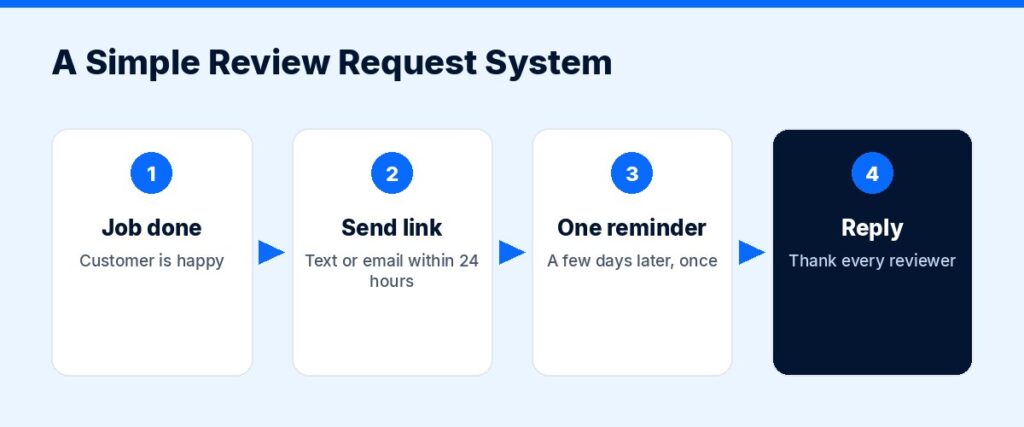
Asking by hand works until you get busy. Automation makes sure every customer gets asked at the right time, every time. A typical setup:
- A job is marked complete or a payment is received in your system.
- A text goes out a few hours later with your review link.
- If there is no review after a few days, one email reminder follows.
- New reviews are flagged so someone replies quickly.
All-in-one platforms such as GoHighLevel include tools for this. Its reputation management page describes automated review requests by text and email after an appointment or sale, plus a central dashboard and AI-drafted replies. Check its current plans before you commit.
Affiliate link — we may earn a commission.
If you would rather have it built for you, our AI automation solutions team can connect review requests to your booking, invoicing or CRM tools.
Step 6: Reply to Every Review
Replying shows future customers that you care, and it encourages more people to leave reviews.
- Positive review: thank them by name, mention the service, keep it short and human.
- Negative review: stay calm, apologize for the experience, take the details offline (“please call me at…”), and fix the problem if you can. Never argue in public.
- Fake or spam review: report it through your Business Profile instead of replying angrily.
The Rules: What You Must Not Do
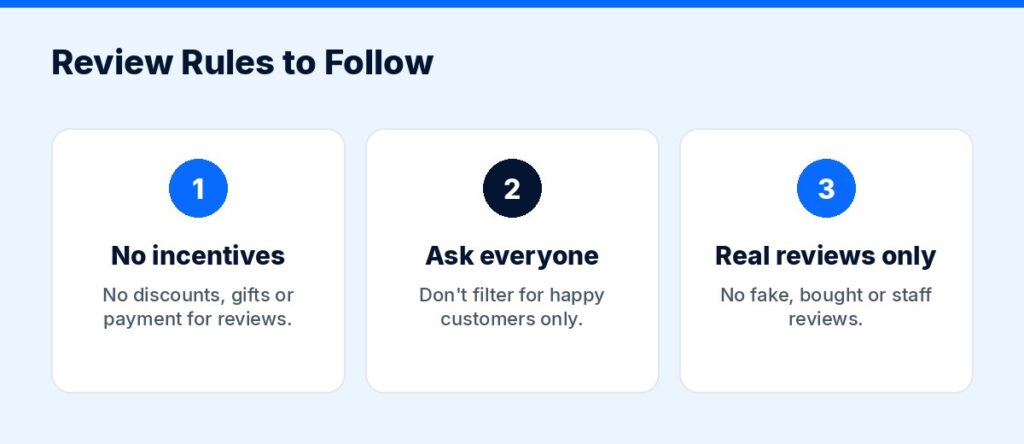
Breaking review rules can get reviews removed, your profile restricted, and in the US it can also bring legal risk.
- No incentives. Google’s Maps user-contributed content policy says you may not offer payment, discounts, free goods or services in exchange for a review, or for changing or removing a negative review.
- No review gating. The same policy says businesses may not discourage negative reviews or selectively ask only happy customers. Ask everyone.
- No fake or employee reviews. Reviews must reflect a genuine experience. Reviews from staff, family or people with a conflict of interest are not allowed.
- No buying reviews. In the US, the FTC’s final rule on consumer reviews and testimonials prohibits buying or selling fake reviews and buying positive or negative reviews, among other practices.
- No pressure on-site. Google’s policy also says merchants should not require or pressure customers to leave reviews while on the premises.
The good news: an honest, consistent ask is all you need.
How Many Reviews Is “Enough”?
There is no official number. Look at the businesses that show in the map pack for your main search terms. Aim to have more recent, detailed reviews than they do, and keep a steady pace rather than a one-time burst.
Want More Reviews Without Thinking About It?
Reviews work best as part of a complete local strategy. Our SEO services include Google Business Profile optimization and review growth, and our automation team can make sure every customer gets asked automatically.
Get Your Free Marketing Audit
Not sure where your next customers should come from? ScaleMyClick’s free marketing audit looks at your SEO, ads, website conversion and automation and points out 3 specific opportunities that could be limiting your growth. No pressure, no long contract talk, just a clear next step.
Related guides
- How to Generate Leads for a Small Business: 15 Proven Ways
- How to Follow Up With Leads (Timing, Channels and Templates)
- Local SEO Checklist for Small Businesses (2026)
- Marketing Tools & Resources (our recommended tools)
FAQ: Getting Google Reviews
How do I get my Google review link?
Open your Business Profile, select Read reviews, then Get more reviews, and copy the link. Google’s help article explains the steps and how to download a QR code.
Can I offer a discount for a Google review?
No. Google’s policies prohibit incentives such as discounts, free products or payment in exchange for reviews. Offering them can lead to reviews being removed.
Is it OK to only ask happy customers for reviews?
No. Google’s policy does not allow selectively soliciting positive reviews. Ask all customers. If you deliver good work, most reviews will be positive anyway.
Can I delete a bad Google review?
You cannot delete reviews yourself. You can reply publicly and professionally, and you can report reviews that break Google’s policies, such as spam or fake reviews.
What is the best way to ask for a review?
Ask soon after a good experience, send a direct review link by text or email, keep the message short and personal, and send at most one reminder.
This contains an affiliate link.

