

If your website is not getting leads, you are not alone. Many small business sites look fine but quietly fail at their one real job: turning visitors into calls, bookings, and quote requests. The good news is that the causes are usually predictable, and most can be fixed without starting from scratch.
Below are the 10 most common reasons a small business website does not generate leads, how to spot each one, and what to do about it.

First, Check: Is It a Traffic Problem or a Conversion Problem?
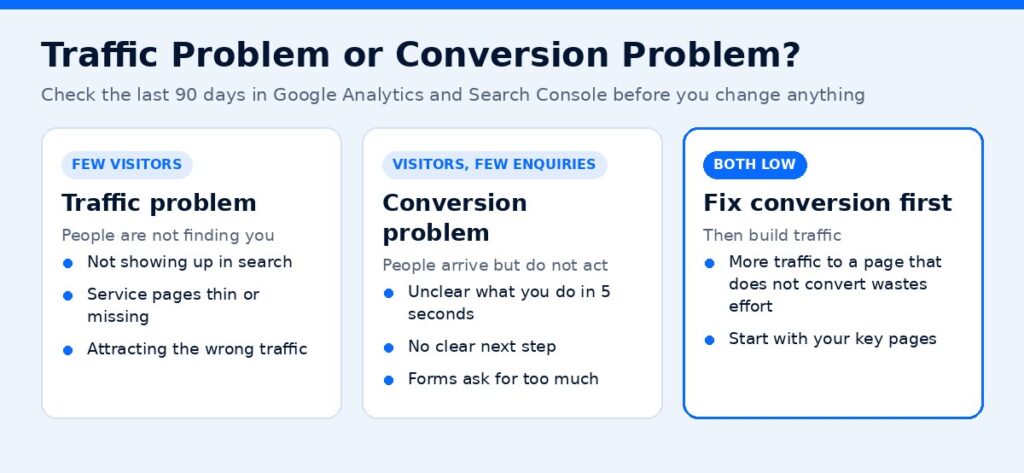
Before you change anything, figure out which problem you have. Open Google Analytics (or your site’s analytics tool) and Google Search Console and look at the last 90 days.
- Few visitors: you have a traffic problem. People are not finding you.
- Plenty of visitors, few enquiries: you have a conversion problem. People arrive but do not act.
- Both low: start with conversion fixes on your key pages, then build traffic. More traffic to a page that does not convert just wastes effort.
Keep this split in mind as you go through the list.
Why Is My Website Not Generating Leads? 10 Common Reasons
1. Visitors cannot tell what you do in five seconds
If your homepage headline says something like “Welcome to Our Website” or “Quality You Can Trust,” visitors have to work to understand your offer. Most will not bother.
Fix: write a headline that states what you do, who it is for, and where. For example: “Emergency Plumbing in St. Petersburg. Same-Day Service, Upfront Pricing.” Put your main call to action right under it.
2. There is no clear next step
Many sites have a “Contact Us” link in the menu and nothing else. Visitors who are ready to act should never have to hunt.
Fix: pick one primary action for each page (call, book, request a quote) and repeat it in the hero, mid-page, and at the end. Use action words on buttons, like “Get My Free Quote” instead of “Submit.”
3. The site is slow
Slow pages frustrate visitors, especially on mobile. Google’s documentation recommends aiming for a Largest Contentful Paint within 2.5 seconds, an Interaction to Next Paint under 200 milliseconds, and a Cumulative Layout Shift under 0.1 (Google Search Central).
Fix: test key pages with PageSpeed Insights. Common wins include compressing images, removing unused plugins, using caching, and avoiding heavy sliders and auto-playing videos above the fold.
4. The mobile experience is clumsy
Many people look up local businesses on their phones. If your phone number is not tappable, buttons are tiny, or pop-ups cover the screen, mobile visitors leave.
Fix: open your own site on your phone and try to contact yourself. Make the phone number a click-to-call link, keep forms short, and make sure the main button is visible without scrolling.
5. Your forms ask for too much
Every extra field is another reason to quit. Long forms that ask for budget, company size, and a detailed description scare off people who just want a quick answer.
Fix: ask for the minimum you need to follow up: name, phone or email, and a short message. Collect the rest on the call. Then test the form yourself to make sure submissions actually reach your inbox.
6. There is no proof you are trustworthy
People hire businesses they trust. If your site has no reviews, no photos of real work, and no details about your team, visitors will choose a competitor who shows those things.
Fix: add genuine customer reviews (with permission), before-and-after photos, certifications, licenses, guarantees, and a short “why choose us” section near your call to action.
7. Service pages are thin or missing
If you offer five services but list them all on one page with a sentence each, you are making it hard for both visitors and search engines to understand what you do.
Fix: give each main service its own page. Explain the problem it solves, how the process works, what it costs or what affects the price, and what to do next. These pages are often your best lead generators.
8. You are attracting the wrong traffic
Sometimes a site gets visitors but they are the wrong ones: job seekers, people outside your service area, or people researching DIY fixes.
Fix: check which pages and searches bring traffic in Search Console. Target keywords that show buying intent and your location, such as “roof repair near me” or “HVAC installation cost Tampa,” rather than broad informational topics only.
9. Your website is not getting traffic from search
If you are not on page one for the searches your customers make, most of them will never see your site. This is a common reason a website is not getting traffic at all.
Fix: start with the basics of SEO: a unique title and meta description for each page, service and location keywords in headings, a complete Google Business Profile, consistent business details across directories, and helpful content that answers real customer questions. For competitive markets, a structured SEO program speeds this up.
10. You are not tracking leads
If you cannot see which pages, ads, or channels produce enquiries, you cannot fix what is broken. Many small businesses only find out their form stopped working weeks later.
Fix: set up conversion tracking for form submissions, phone clicks, and bookings. Review the numbers monthly. Even a simple spreadsheet of where each lead came from is better than guessing.
Website Conversion Rate Optimization: A Quick Checklist
Use this checklist on your homepage and your top three service pages:
- Headline says what you do, for whom, and where
- One primary call to action, repeated at least three times
- Phone number is visible and tappable on mobile
- Form has five fields or fewer and has been tested this week
- Reviews or proof appear near each call to action
- Page loads quickly on a phone
- Each service has its own page with clear next steps
- Analytics tracks forms, calls, and bookings
What to Fix First
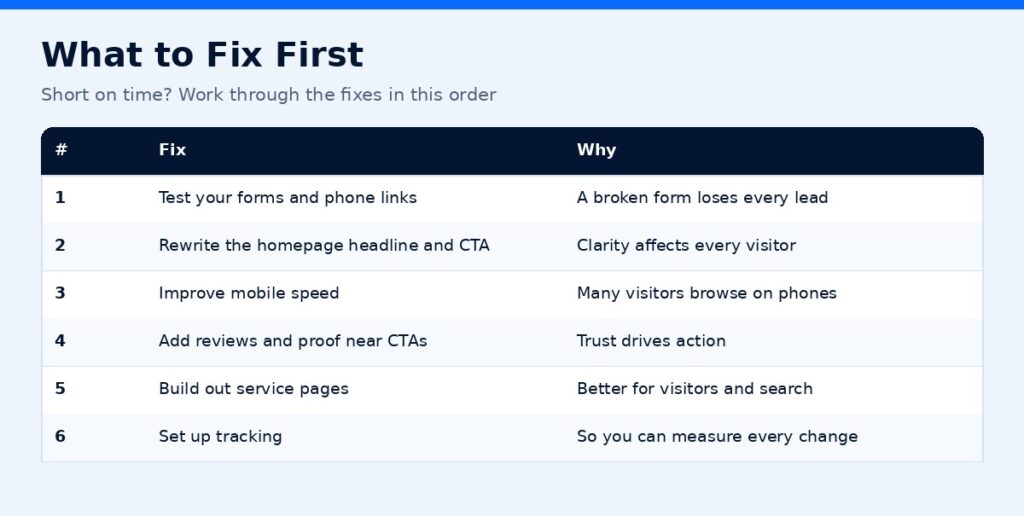
If you have limited time, use this order:
| Priority | Fix | Why |
|---|---|---|
| 1 | Test your forms and phone links | A broken form loses every lead |
| 2 | Rewrite the homepage headline and CTA | Clarity affects every visitor |
| 3 | Improve mobile speed | Many visitors browse on phones |
| 4 | Add reviews and proof near CTAs | Trust drives action |
| 5 | Build out service pages | Better for visitors and search |
| 6 | Set up tracking | So you can measure every change |
When to Get Help
If you have worked through this list and leads are still flat, the issue may be deeper: site structure, technical SEO, or a design that fights against conversions. That is where a fresh set of eyes helps. ScaleMyClick builds conversion-focused websites and pairs them with search strategy so the right visitors arrive and know exactly what to do next.
Get a Free Marketing Audit
Not sure whether your current website is helping or hurting? ScaleMyClick offers a free marketing audit for small businesses. You get a plain-English look at your site, your search visibility, and where leads are slipping away, plus a short list of fixes in priority order.
Related guides
- Landing Page Best Practices for 2026: 14 Rules That Lift Conversions
- How to Generate Leads for a Small Business: 15 Proven Ways
- Google Ads Not Converting? 11 Fixes for Small Businesses
FAQs
How do I know if my website is the problem or my marketing?
Look at traffic and enquiries separately. If plenty of people visit but few contact you, the website is likely the issue. If very few people visit, your marketing or SEO needs work first.
How long does it take to see more leads after fixing my website?
Conversion fixes like clearer headlines, shorter forms, and working phone links can show results quickly because they affect visitors you already have. SEO improvements usually take longer to show up in rankings.
Do I need a new website to get more leads?
Not always. Many sites improve significantly with better copy, faster pages, stronger calls to action, and proper tracking. A rebuild makes sense when the site is slow, outdated, or hard to update.
What is a good number of fields for a contact form?
Ask only for what you need to follow up, usually a name, a phone number or email, and a short message. You can collect more details once you are talking to the customer.
Should I add live chat to my website?
Live chat can help if someone can respond quickly during business hours, or if you use an automated assistant that hands off to a person. Unanswered chat windows can hurt trust, so only add it if you can support it.

